Best Lip Sync AI: We Made a Photo Talk with 6 Models (2026 Test)
5 portraits, 3 voice tracks, 124 clips: which model makes the best talking photo, plus two ways to make one on Clipia, from text or your own voice
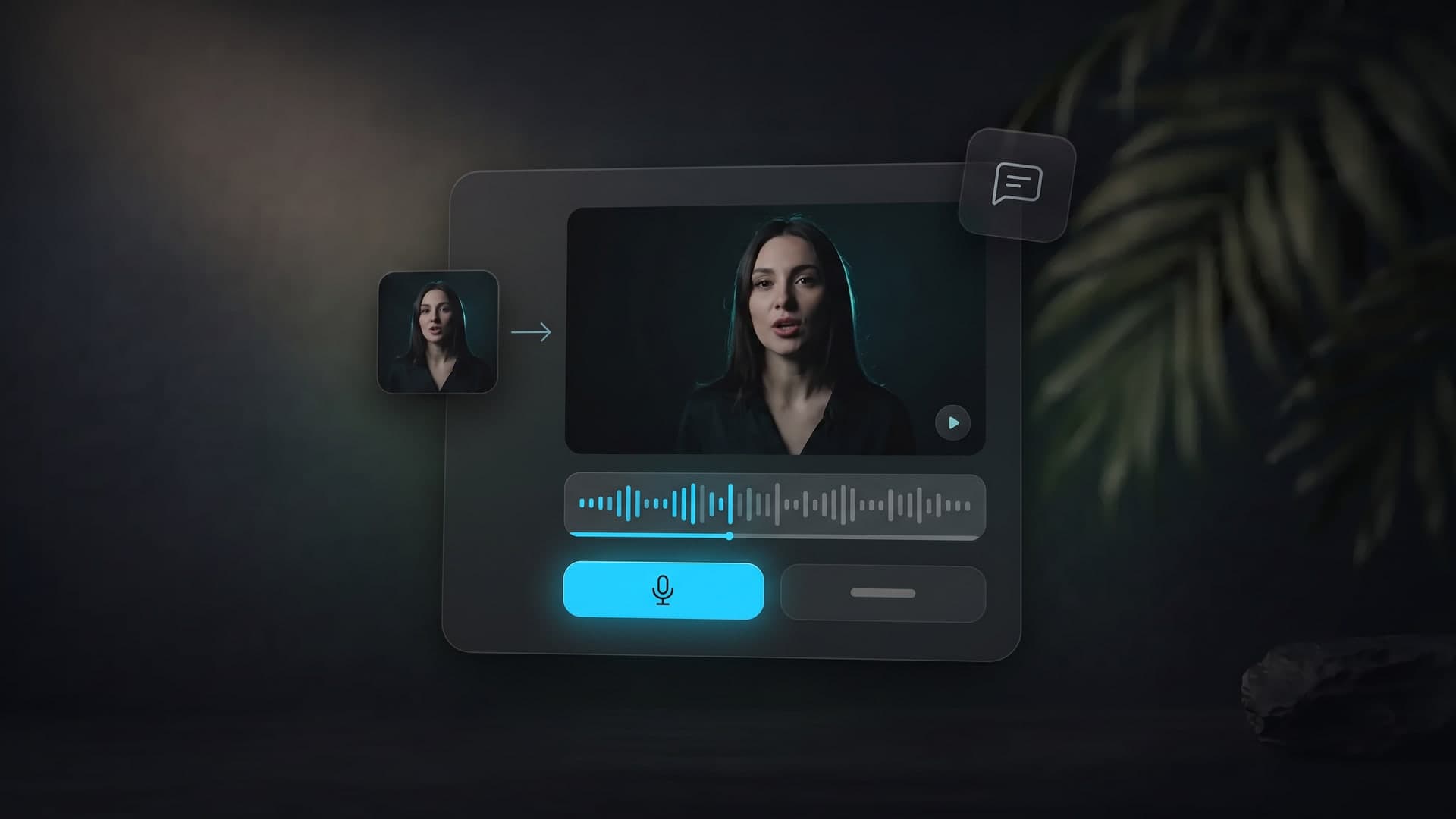
A talking photo is a short video where the person in a picture speaks your words: you either type the text or upload your own audio file. The AI takes a portrait and the speech, matches the lips, facial expressions and head movement to the sound, and returns a clip as long as the speech. The technique is called lip sync, and the result is often called a talking avatar. On Clipia you can make a photo talk in a couple of minutes, with no camera, microphone or editing.
There are plenty of "top 7 tools" lists on this topic, but almost nobody compares the models on identical inputs, and almost nobody tests a language other than English. So we ran our own test to find the best lip sync AI for a talking photo. We took 5 portraits and 3 Russian voice tracks and pushed the same pairs through 6 models: Kling AI Avatar, HeyGen Avatar IV, OmniHuman v2, InfiniteTalk, LongCat Avatar 1.5 and MiniMax H3. That is 124 clips in total, including four one-minute clips. Below are the clips, the measurements and the takeaways.
Quick answer: which AI model is best for lip sync?
- Best balance of quality and price: Kling AI Avatar by Kuaishou. 720p at 30 fps, natural head and hand movement. On one-minute and three-minute clips the face did not drift and the motion did not loop. On Clipia it powers the “Own file” path of Talking Photo: upload your own voice recording, and 10 seconds cost 41 credits (checked against the calculator on 26 October 2026).
- Sharpest face: HeyGen Avatar IV (231 in our sharpness metric vs 190 for Kling). The head, however, barely moves, which becomes noticeable on longer clips.
- Fastest: MiniMax H3, about 20 seconds per clip. In its budget mode it is 480p with the lowest sharpness in the test.
- Slowest: LongCat Avatar 1.5, about 13 minutes for a 10-second clip.
- Kling Avatar Pro at 1080p is not "twice as good" as Standard, even though it costs exactly twice as much. Skin and teeth look cleaner, but the image is softer, not sharper.
- All 6 models accepted non-English (Russian) speech, and moderation rejected none of the clips, including a 3D character and a portrait holding a product.
- No voice recording? Take the “Text” path. On Clipia it runs on the HeyGen Video model: type the line, and a 10-second clip in 768p costs 15 credits. It is the cheapest way to make a photo talk.
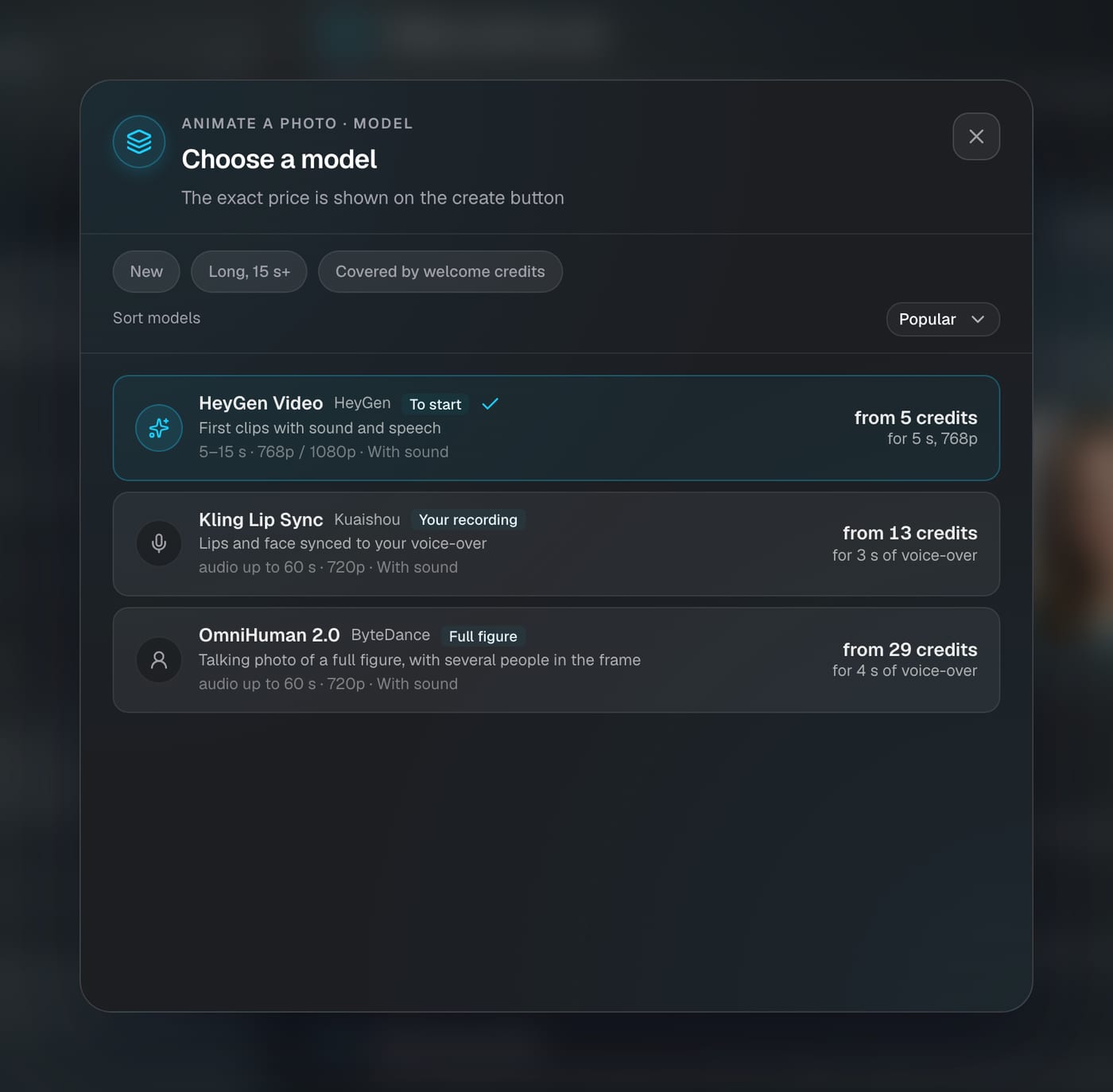
- Full figure or several people in the frame: OmniHuman 2.0 by ByteDance. The third model in the Talking Photo picker: your own recording from 4 to 60 seconds, 720p, from 29 credits for 4 seconds.
Open Talking Photo on Clipia: upload a front-facing portrait, then type the text or upload your own 3–60 second recording. The price in credits is shown on the “Make it talk” button before you start.
Kling AI Avatar Standard: a portrait and a calm 9-second female voice track. 720×1280, 30 fps; a clip like this takes about 4.5 minutes on average.
How AI makes a picture talk
The model receives two files: a portrait and audio. From the audio it extracts phonemes and speech rhythm, then draws a new video frame by frame. Lips open on vowels and close on "p", "b" and "m". Brows and cheeks react to intonation, and the head and shoulders move the way a speaking person moves. The clip length is set by the audio, so silence at the start or end of the recording becomes seconds of silence on screen. If you type the text instead of uploading a recording, the speech is first synthesised with an AI voice, and then the same thing happens: the lips are matched to the resulting audio.
A talking photo is not the same as regular photo animation. When you animate a photo from a prompt, the model invents the motion and there is no speech. In photo-to-video with sound, the sound is generated together with the picture and the model chooses the words. In a talking photo you supply the words and the voice; the model only has to make the person in the picture say them convincingly.
How we tested
- When and how: 22–23 October 2026; every clip was produced by an actual generation on identical inputs, with the same portraits and the same recordings for every model.
- 5 portraits, all AI-generated, no real people: a man aged 35–45, a woman aged 25–35, an elderly person, a 3D character and a woman holding a product.
- 3 Russian voice tracks in a male and a female voice, each portrait paired with a voice of its gender:
- calm — 8.6–9.1 s;
- fast — 8.2–9.1 s;
- emotional — 12.2–13.0 s.
- 8 variants across 6 models: Kling AI Avatar Standard and Pro, InfiniteTalk 720p, LongCat Avatar 1.5 720p, MiniMax H3 480p, OmniHuman v2, HeyGen Avatar IV with our audio and HeyGen Avatar IV with its own text-to-speech. Each variant produced 15 clips covering every portrait × voice pair.
- Long clips: a one-minute track (59.6 s) on four models and a three-minute track (180 s) on Kling AI Avatar, to check for face drift and looping.
- Clips in this article: the scores and timings below come from the Russian-speech test. For English readers we re-rendered the embedded clips on the same portraits and the same models with English voice tracks: calm (9.3 s), fast (8.1–9.0 s), emotional (9.9 s) and a 53-second story.
- What we measured:
- resolution and frame rate;
- time to a finished file;
- face sharpness (variance of the Laplacian on the face area resized to 256×256);
- mouth-to-audio sync (correlation between mouth motion and loudness, best offset within ±400 ms);
- share of repeating segments in long clips.
An honest caveat. We prepared the clips for a blind viewer rating, with model names removed and the order shuffled. Those ratings are still being collected, so the conclusions below rely only on objective measurements and on what is visible to the eye. Our sync metric is coarse: differences within ±0.05 are noise, and it cannot tell "p", "b", "m" or sibilants apart. We will update this article once the ratings are in.
Results: comparison table
| Model | Resolution, fps | Time per ~10 s clip | Face sharpness | Mouth ↔ audio | 60-second clip |
|---|---|---|---|---|---|
| Kling AI Avatar Standard | 720×1280, 30 | ~4.5 min | 190 | 0.16* | no drift, 13.5 min |
| Kling AI Avatar Pro | 1072×1920, 30 | ~5.3 min | 127** | 0.16* | not tested |
| HeyGen Avatar IV | 714×1280, 25 | ~1.8 min | 231 | 0.23–0.26 | no loop, static head; 2.2 min |
| OmniHuman v2 | 716×1284, 24 | ~2.9 min | 172 | 0.23–0.26 | no drift, 7.9 min |
| InfiniteTalk 720p | 704×1280, 25 | ~5.2 min | 149 | 0.23–0.26 | no drift, 26 min |
| LongCat Avatar 1.5 720p | 736×1248, 25 | ~13 min | 210 | 0.23–0.26 | not tested |
| MiniMax H3 480p | 480×832, 24 | ~20 s | 102 | 0.23–0.26 | not tested |
* Kling scores lower on sync, but its mouth opens as wide as the others (0.22–0.24). Most likely the active head and hand movement blurs the metric because the mouth area shifts in the frame. ** Pro's low sharpness means a soft, clean image rather than blur; details below. Times are averages from our runs and depend on server load.
Model-by-model review with examples
1. Kling AI Avatar (Kuaishou): best balance
Kling AI Avatar is a talking-avatar model by Kuaishou, the developer of the Kling video model. In our test the Standard version produced 720×1280 at 30 fps and took 264 seconds on average for a 10-second clip. What sets it apart is the body. Kling moves more than the lips: the head turns, the shoulders breathe, and if hands are in the frame, they gesture. On the fast and emotional tracks it looks the most alive.
Kling AI Avatar Standard with the fast male track: "Listen, I'll explain it in a couple of seconds: take a photo, type the text, press the button, and a minute later you've got a finished clip. No camera, no microphone!"
Kling AI Avatar Standard on a 3D character with a 10-second emotional line. The model keeps the stylised face instead of turning it photorealistic.
Kling was the most stable model on long clips. The one-minute clip took 13.5 minutes and the three-minute clip took 50.5 minutes. Neither contained repeating segments, and the colour shifted by only 2.5–3.2 out of 255 by the end, which is invisible to the eye.
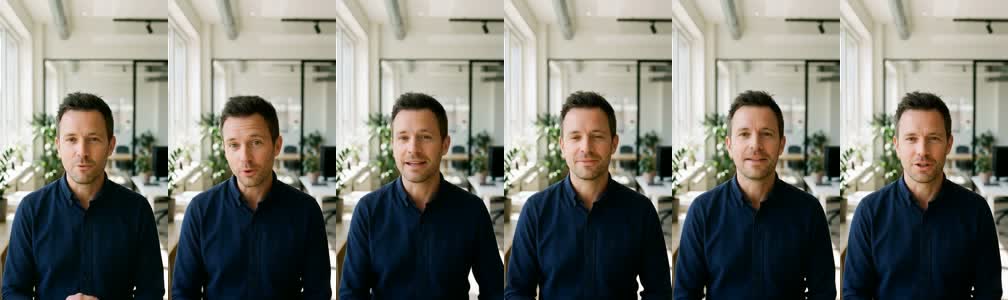
A 53-second Kling AI Avatar Standard clip. You can make a talking photo this long on Clipia too: with your own voice recording a clip runs up to 60 seconds.
Weak spot: Standard renders with aggressive sharpening. In close-ups you can see grain and hard edges, especially on teeth.
2. Kling AI Avatar Pro at 1080p: twice the price, not twice the quality
Pro is not an upscale of Standard but a separate render at 1072×1920. At the same moment, Pro and Standard frames differ almost as much as Standard differs from itself half a second later: the lips and head move in their own way. Pro costs exactly twice as much and takes 20% longer. Its image is softer: scaled down to 720p, Pro has 0.42 of Standard's facial detail. In return you get smoother skin and cleaner teeth.
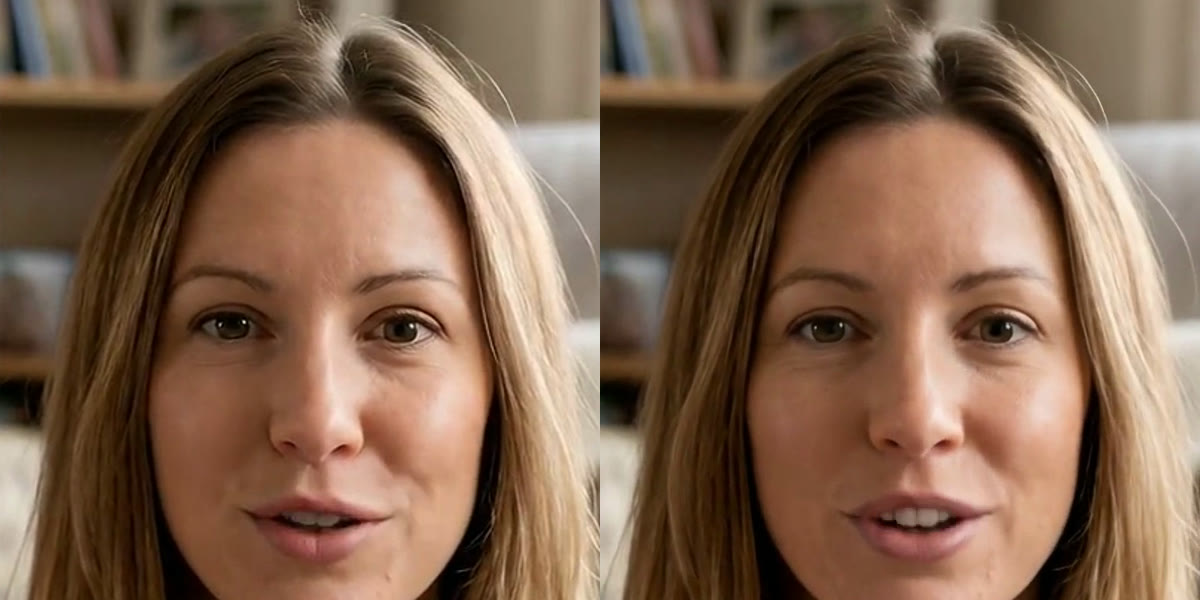
Kling AI Avatar Pro on the same portrait and voice as the first clip in this article. Compare the teeth and skin.
Verdict: on a phone screen Pro does not look twice as good. It is worth paying for only if the clip goes on a big screen or a mouth close-up matters more than anything else.
3. HeyGen Avatar IV: sharpest face, static head
HeyGen Avatar IV is a model by the US company HeyGen; we ran it on the same pairs as the others. Its face sharpness was the best in the test at 231, and a 10-second clip was ready in under 2 minutes. The head moves less than with any other model. On a short clip this reads as a calm delivery. On a one-minute clip, similar-looking segments appear towards the end: it is not looping, but viewers will notice the monotony.
HeyGen Avatar IV with our voice track: the same pair as Kling above.
HeyGen Avatar IV on the portrait holding a product, fast track.
HeyGen also has a mode where it voices the text itself. In that mode the clip length differed from our recording by up to 5.4 seconds, and the service picks the intonation. Lip sync in this mode cannot be compared with the others because the voice is different.
HeyGen Avatar IV reading the same text in its own voice.
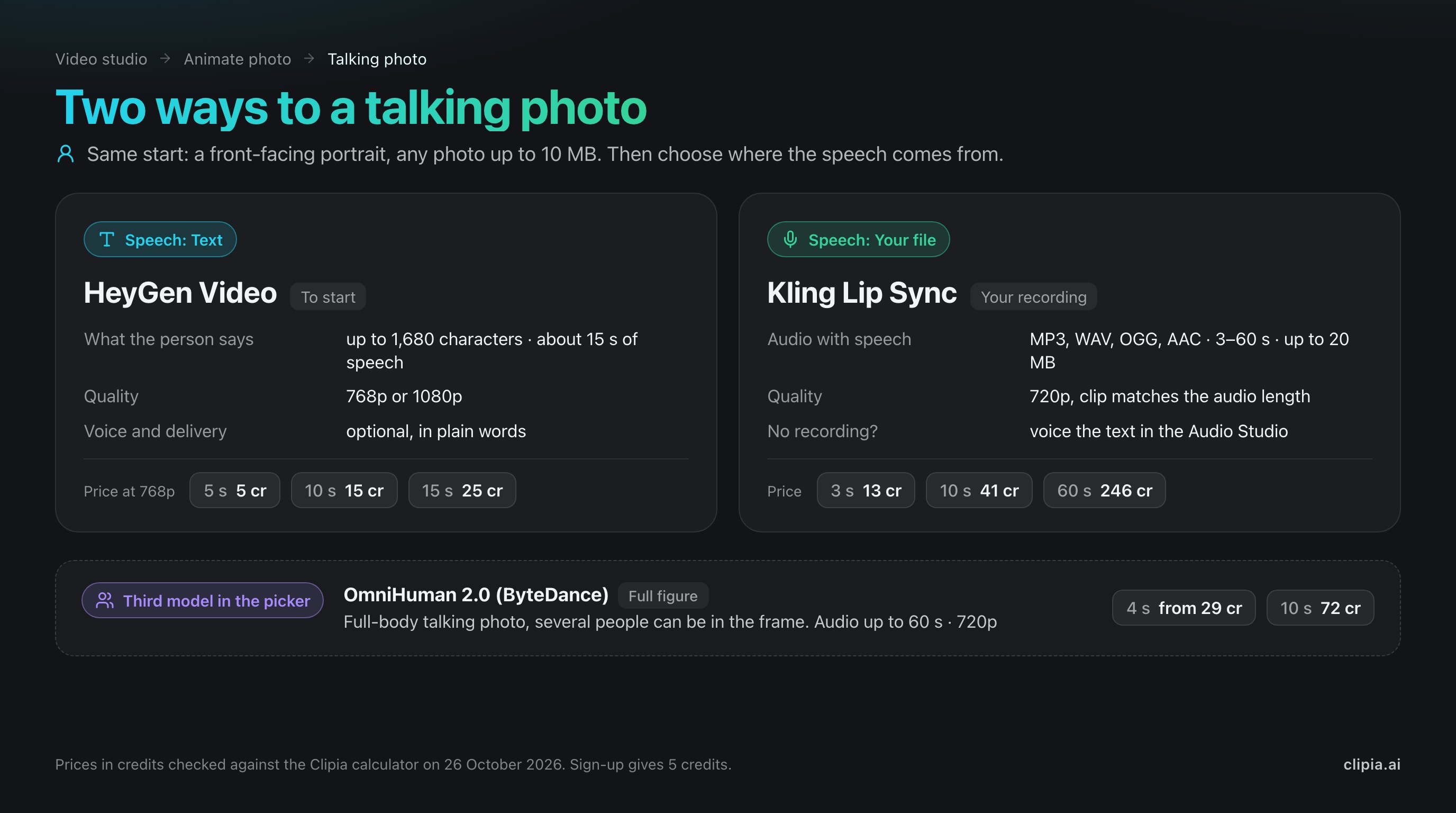
The “Text” path on Clipia works on the same principle: the HeyGen Video model voices the typed line and makes the talking photo in one go. The field takes up to 1,680 characters, but the clip is capped at 15 seconds, so the studio shows an estimate, “About N s of speech”, right under the text. Quality is 768p or 1080p, and you can describe the voice and delivery in plain words in an optional field. Price: 5, 15 and 25 credits for 5, 10 and 15 seconds in 768p, and 35, 70 and 105 in 1080p. More on the HeyGen Video model page.
4. OmniHuman v2 (ByteDance): expressive, with a silent tail
OmniHuman is ByteDance's model for animating a person from a photo and audio. Version 2 outputs 716×1284 at 24 fps, takes about 3 minutes for a 10-second clip and plays emotions vividly. There is no drift on the one-minute clip. One quirk gets in the way of editing: the clip is on average 0.6 seconds longer than the audio, and the character stays silent at the end. If you stitch several talking segments together, you will need to trim that tail.
OmniHuman v2 on the 3D character, emotional line: "No way! Did it actually work? All those sleepless nights... Thank you so much. This is just amazing!"
OmniHuman v2 on the portrait holding a product, calm track.
On Clipia, OmniHuman 2.0 is the third model in the Talking Photo picker, labelled “Full figure”: it animates a person head to toe and handles a frame with several people. It works with your own recording from 4 to 60 seconds and outputs 720p. It costs more than Kling Lip Sync, from 29 credits for 4 seconds, 72 credits for 10 seconds and 432 for a minute, so pick it for full-body shots and groups rather than an ordinary portrait. More on the OmniHuman 2.0 model page.
5. InfiniteTalk 720p (MeiGen): open model for long speech
InfiniteTalk is an open model by the MeiGen team, built for long talking videos. In our test it produced 704×1280 at 25 fps and took 5 minutes for a 10-second clip. It holds a one-minute clip without drift but takes a long time, 26 minutes. Face sharpness is average at 149.
InfiniteTalk on the elderly portrait, emotional line.
6. LongCat Avatar 1.5 (Meituan): sharp but very slow
LongCat Avatar is a model by Meituan. Version 1.5 at 720p delivered the second-sharpest face in the test (210), but a 10-second clip takes about 13 minutes, three times longer than Kling. That is acceptable for a single clip, not for a series. For that reason we did not run the one-minute clip on it.
LongCat Avatar 1.5 on the same pair as InfiniteTalk above.
7. MiniMax H3 480p: the fastest draft
The MiniMax model in its cheapest 480p mode outputs 480×832 at 24 fps. A clip is ready in about 20 seconds, 5 to 40 times faster than the rest. The trade-off is image quality: face sharpness of 102, the lowest in the test. It is good for quickly checking the text and delivery, not for a final clip.
MiniMax H3 480p with the same fast track as Kling above.
Where talking photos break and how to avoid it
- Silence at the edges of the audio. The clip lasts exactly as long as the recording. Half a second of silence at the start means half a second of a frozen face. Trim pauses before uploading.
- Too much text. In our measurement across 20 phrases, AI voice-over in Russian averaged 13.75 characters per second. To be sure the clip fits the limit, plan on 12 characters per second: 15 seconds fit about 180 characters including spaces, one minute about 720. Numbers such as "30%" are read out as words and eat time; such phrases ran at 11.6 characters per second. English is denser: the English tracks for the clips in this article ran at 15–16 characters per second at normal speed and 19–21 at a brisk pace. On the “Text” path the field takes up to 1,680 characters, but the clip is capped at 15 seconds: watch the “About N s of speech” estimate under the field and split a long line into several clips.
- Music and noise in the recording. Lip sync follows loudness rhythm. Music under the voice throws the lips off, and the character starts "singing along" where it shouldn't.
- A face in profile or a hand over the mouth. Every model works best with a front-facing portrait where the mouth is clearly visible. All five of our portraits had an open face, and there were no failures.
- Two people in the frame. Users report that with one voice track both people start talking. For Kling Lip Sync and HeyGen Video use a photo with one face; if the shot needs a group or a full-body figure, switch to OmniHuman 2.0, which is built for such scenes.
- Someone else's face. Only use photos of other people with their consent. Clipia rejects photos of celebrities.
How to make a picture talk on Clipia: step by step
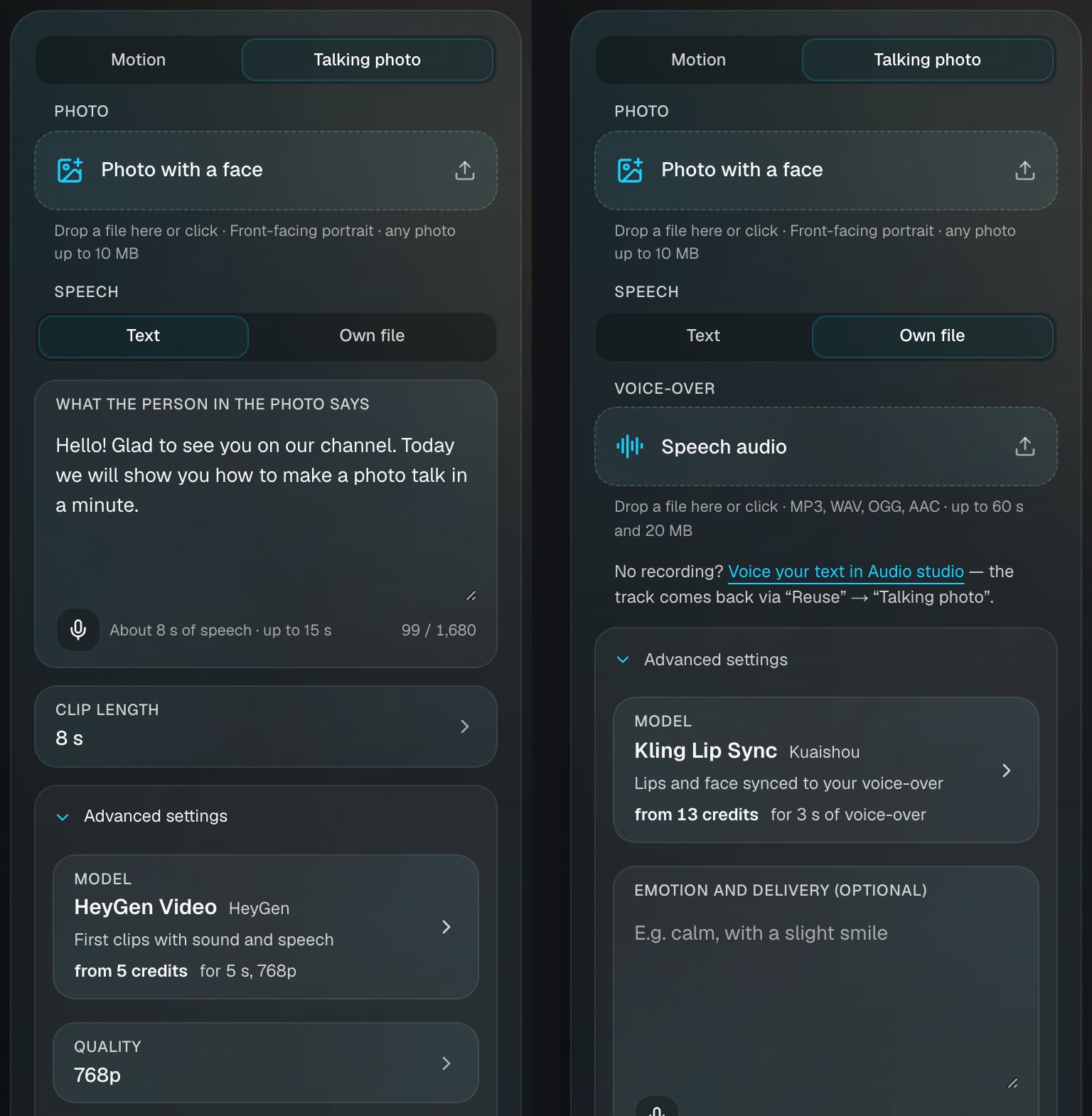
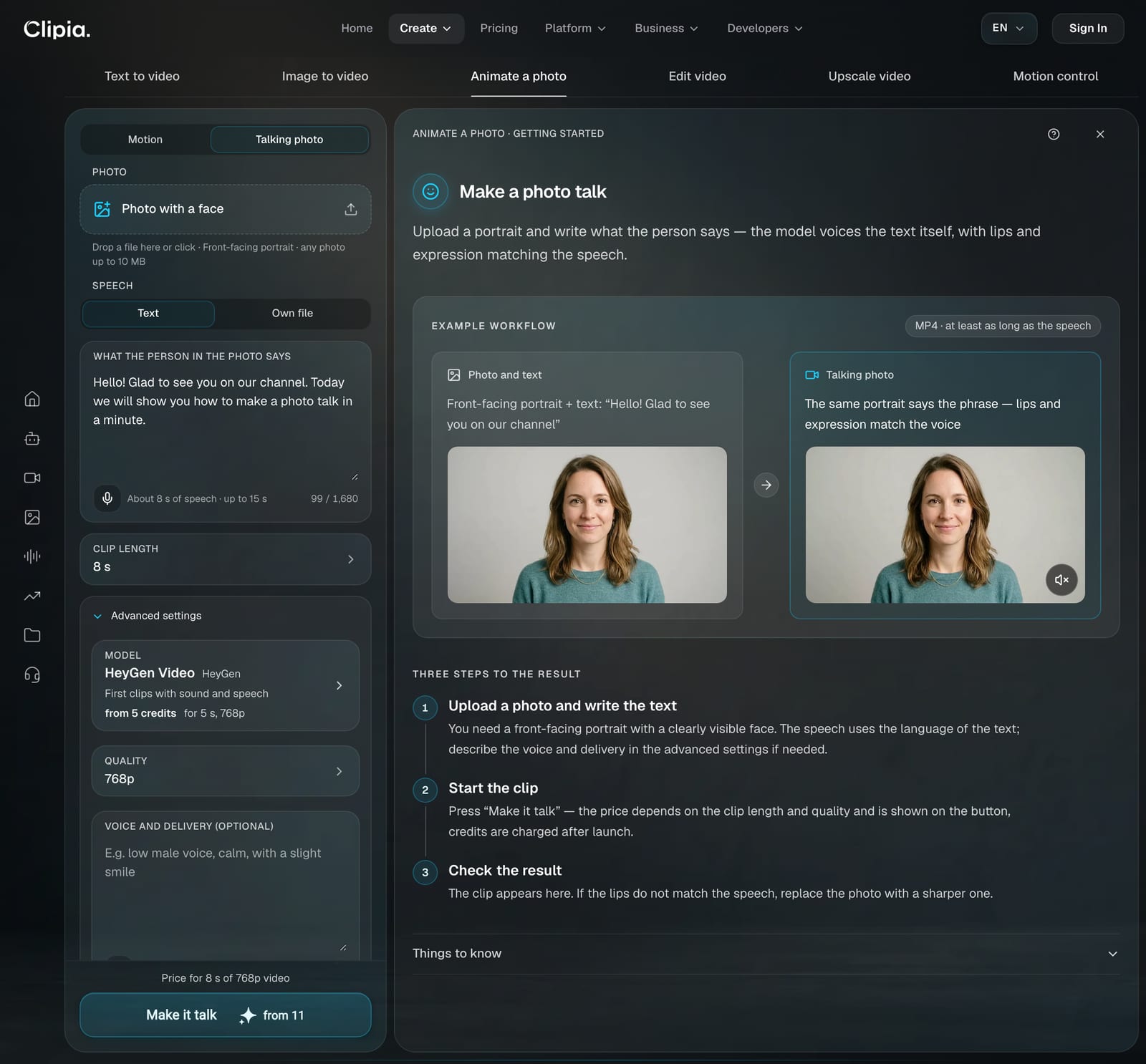
Both paths start the same way. Open Talking Photo, a sub-mode of the Animate photo tab in the video studio, and upload a front-facing portrait, any photo up to 10 MB. Then, under Speech, choose where the voice comes from: type the text or upload your own file.
Path 1. Speech from text: no microphone, from 5 credits
- Under Speech, keep “Text” and write what the person in the photo says. The field takes up to 1,680 characters, but the clip is capped at 15 seconds, so the “About N s of speech” estimate appears right under the text. For 15 seconds, aim for about 180 characters.
- Pick the clip length: any whole number from 5 to 15 seconds, with a little headroom over the speech estimate.
- Check Advanced settings. The model is HeyGen Video; here you choose 768p or 1080p and, if you like, describe the voice and delivery in plain words: “calm female voice, with a smile”.
- Press “Make it talk”. The price is on the button: 5 credits for 5 seconds in 768p, 15 credits for 10 seconds.
Path 2. Your own recording: your voice, up to 60 seconds
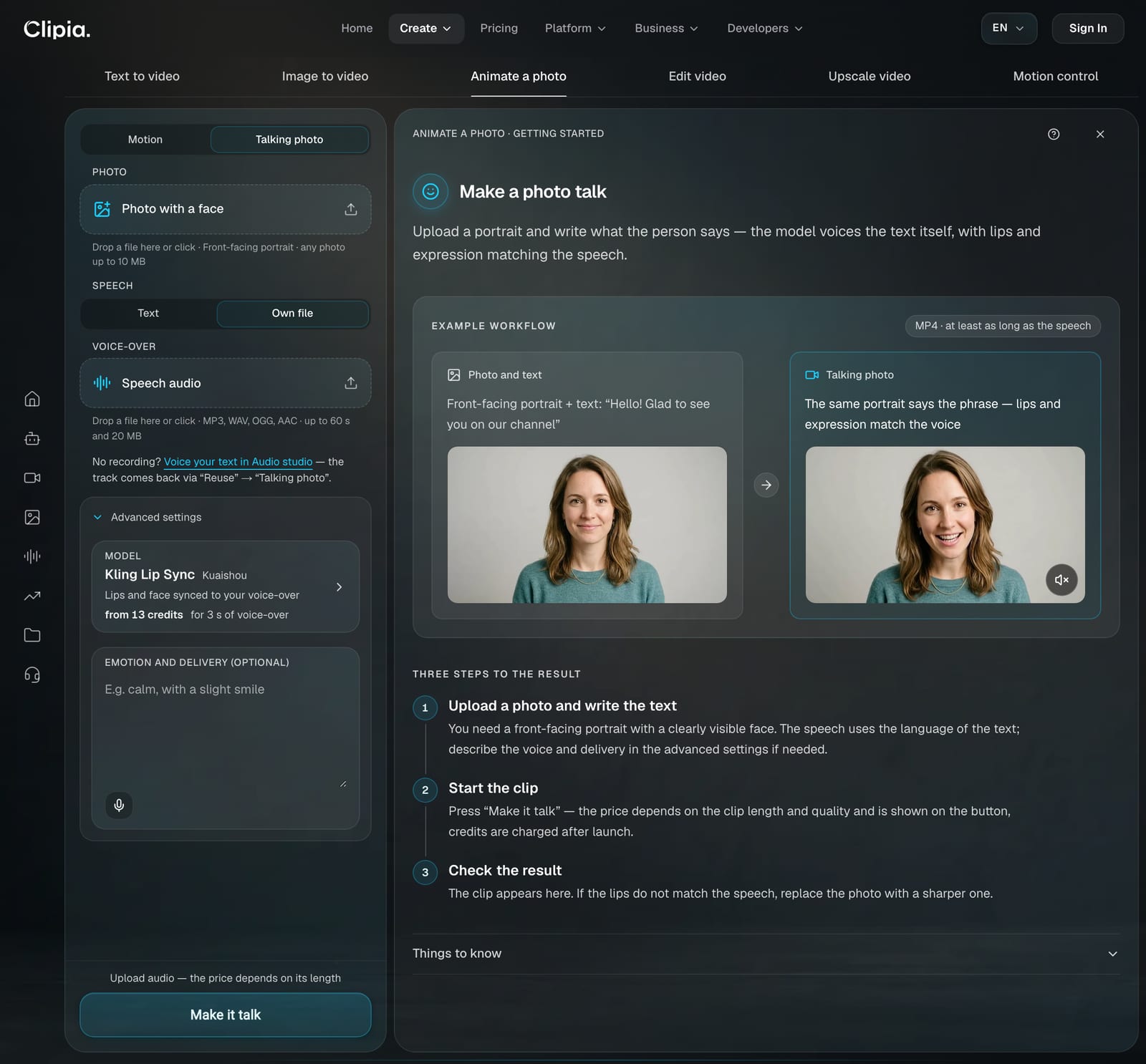
- Prepare the voice. If you have no recording, voice your text in the Audio Studio: pick a voice, paste your text (about 180 characters per 15 seconds) and press “Reuse” → “Talking photo”. The track comes back to the studio by itself, with nothing to download or upload. More on choosing a voice in our guide to AI voice-over.
- Under Speech, choose “Own file” and upload the audio: MP3, WAV, OGG or AAC, 3 to 60 seconds, up to 20 MB.
- Check the model. The default is Kling Lip Sync, the Kling AI Avatar Standard from our test. For a full-body figure or several people in the frame, switch to OmniHuman 2.0 (recording from 4 seconds).
- Set the delivery in the optional “Emotion and delivery” field: “calm”, “smiling”, “cheerful”.
- Press “Make it talk”. The price in credits is shown on the button before you start; the clip comes out in 720p and matches the audio length.
How much it costs
| Clip length | “Text” → HeyGen Video, 768p | “Own file” → Kling Lip Sync, 720p | “Own file” → OmniHuman 2.0, 720p |
|---|---|---|---|
| 3 seconds | — | 13 credits | — |
| 4 seconds | — | — | 29 credits |
| 5 seconds | 5 credits | 21 credits | 36 credits |
| 10 seconds | 15 credits | 41 credits | 72 credits |
| 15 seconds | 25 credits | 62 credits | 108 credits |
| 30 seconds | — | 123 credits | 216 credits |
| 60 seconds | — | 246 credits | 432 credits |
Prices checked against the Clipia calculator on 26 October 2026. HeyGen Video also has 1080p: 35, 70 and 105 credits for 5, 10 and 15 seconds. For any other recording length, the price is shown on the “Make it talk” button before you start. The Basic plan at $10 a month includes 240 credits: 16 ten-second clips from text or five with your own recording. A one-minute Kling Lip Sync clip needs 246 credits, slightly more than a month of Basic, so the Standard plan with 480 credits fits it better. All plans are on the pricing page.
Which model to choose: best for
| Best for | Model | Why |
|---|---|---|
| Social, ads or training videos in a non-English language | Kling AI Avatar Standard | Lively body, stable face, 720p |
| A clip without a voice recording, for the fewest credits | HeyGen Video (the “Text” path on Clipia) | Voices the typed line, 5–15 seconds, from 5 credits |
| Close-ups and big screens | Kling AI Avatar Pro or HeyGen Avatar IV | Cleaner skin and teeth on Pro; the sharpest face on HeyGen, if a nearly static head is fine |
| Strong emotion in a short clip | OmniHuman v2 | Expressive face; the silent tail at the end needs trimming |
| A full-body figure or several people in the frame | OmniHuman 2.0 | The only one of Clipia’s three Talking Photo models built for a full figure; pricier than Kling |
| A long lecture on an open model | InfiniteTalk | A minute without drift, but slow to render |
| A quick draft | MiniMax H3 at 480p | About 20 seconds per clip, low sharpness |
FAQ
Which AI model is best for lip sync?
In our test on 15 portrait + Russian voice pairs, Kling AI Avatar by Kuaishou showed the best balance: 720p, 30 fps, natural head and hand movement, and no face drift on a 3-minute clip. HeyGen Avatar IV had the sharpest face (231 vs 190), but its head barely moves. We will add a final ranking based on viewer ratings after the blind vote.
Are the 5 sign-up credits enough for a talking photo?
Yes, for the shortest clip from text. New Clipia accounts get 5 credits at sign-up, and 5 seconds in HeyGen Video (the “Text” path, 768p) cost exactly 5 credits. With your own voice recording they are not enough: 3 seconds in Kling Lip Sync cost 13 credits and 10 seconds cost 41 (checked on 26 October 2026). The Basic plan is $10 a month for 240 credits: 16 ten-second clips from text or five with your own recording.
Can I make a talking photo without recording my voice?
Yes. On Clipia choose “Text” under Speech, type the line and, if you like, describe the voice in plain words: the HeyGen Video model voices the text and matches the lips itself. The second way is to voice the text in the Audio Studio and send the track back to Talking Photo with the “Reuse” button: then Kling Lip Sync makes the clip, and it can run up to 60 seconds.
Text or own file: which should I choose?
“Text” if you have no recording and need a short clip up to 15 seconds for the fewest credits: 10 seconds cost 15 credits versus 41 with your own recording. “Own file” if your own voice matters, you need up to 60 seconds, or you want the lively head and hand movement Kling AI Avatar showed in the test. For a full-body figure or several people in the frame, choose “Own file” and the OmniHuman 2.0 model.
How long can a talking photo video be?
It depends on the path. From text (HeyGen Video), 5 to 15 seconds. With your own recording (Kling Lip Sync or OmniHuman 2.0), 3 to 60 seconds, and the clip matches the audio length. The Kling AI Avatar model itself handled 60 and 180 seconds in our test without face drift, but took 13.5 and 50.5 minutes to render them. A monologue longer than a minute is assembled from several segments.
Does lip sync work in languages other than English?
Yes. We ran the whole test in Russian, and all 6 models accepted the speech without a single rejected clip. The clips embedded in this article were re-rendered with English voice tracks on the same portraits. For timing, AI voice-over in Russian averaged 13.75 characters per second in our measurement; plan on 12 per second, which is about 180 characters for 15 seconds.
How long does it take to make a picture talk?
A 10-second clip on Kling AI Avatar Standard took 4.5 minutes on average in our test. MiniMax H3 was the fastest at about 20 seconds, but in 480p. LongCat Avatar 1.5 was the slowest at about 13 minutes.
What is OmniHuman?
OmniHuman is ByteDance's model that animates a person from a single photo and an audio track. In our test, version 2 produced 716×1284 at 24 fps in about 3 minutes per 10-second clip, played emotions vividly and added about 0.6 seconds of silence at the end of each clip.
Is lip syncing someone's photo legal?
Using a person's face without their consent is not acceptable: it violates their image rights, and a video that impersonates a real person can be used for fraud. Animate your own photos, photos of people who gave written consent, or AI-generated portraits. Clipia rejects photos of celebrities.
Is 1080p worth paying for?
Usually not. Kling AI Avatar Pro at 1080p costs twice as much as Standard and takes 20% longer, but its image is softer, not sharper. The gain is cleaner skin and teeth, which is hard to see on a phone screen.
Sources
- Clipia's own test, 22–23 October 2026: 124 clips, 5 portraits, 3 Russian voice tracks, 8 variants across 6 models; sharpness, sync and drift measurements.
- Kling AI Avatar 2.0, Kuaishou's user guide: kling.ai/quickstart/kling-ai-avatar-2-user-guide.
- HeyGen Avatar IV, HeyGen's photo avatar page: heygen.com/avatars/ai-photo-avatar.
- OmniHuman, ByteDance project page: omnihuman-lab.github.io.
- InfiniteTalk, MeiGen repository: github.com/MeiGen-AI/InfiniteTalk.
- LongCat-Video-Avatar 1.5, Meituan repository: github.com/meituan-longcat/LongCat-Video.
- Clipia prices: the calculator for the HeyGen Video, Kling Lip Sync and OmniHuman 2.0 models, as of 26 October 2026.
Try it yourself on Clipia
60+ models for video and image generation. One account, transparent pricing.