Skip to content
Clipia.
Home
What are we creating?

Pick a mode — Studio opens with the right prompt ready

All templates
Text
AI AssistantChat, ideas and scriptsPrompt EngineerCraft the perfect promptConcept DesignerVibe, palette, moodboard and refsTutorStep-by-step, explains the why
Images
Text → imageGenerate an image from a promptEditModify an existing photoImage templatesReady-made product shots and artAI Image GeneratorImages from text or photos
Video
Text → videoDescribe a scene and get a clipImage → videoBring a frame to life with motionVideo templatesReady-made scenes and stylesAI Video GeneratorText and image to finished videoPhoto → Video AIAnimate a frame with AIStudioVideo and images in one flow
Pricing
AboutTeam, mission and contactsWhat's NewLatest features and updatesBlogGuides, cases and newsModelsAI model catalogSupportTech help and contacts
For BusinessAPI, MCP and ruble billingSolutions by industryAI for interiors, ads, restaurants and more nichesFor PartnersReferral program
MCP & CLINewGenerate in Claude, Cursor & CLIAI GatewayOpenAI-compatible LLM API in rublesDocumentationAPI reference and guidesDeveloper APIREST API and SDK
Sign In
  • Home

  • Assistant

    NEW
  • Create Video

  • Create Image

  • Studio

  • My Works

  • Models

  • Support

Ready to create the impossible?

Welcome credits are already on your account — start creating.

Clipia.

Think differently — create the impossible.

All systems operational

Creation

  • Create Image
  • Create Video
  • AI Video Generator
  • AI Image Generator
  • Photo to Video AI

Solutions

  • For interiors
  • For advertising
  • For restaurants
  • For online schools
  • For game dev
  • For events
  • All solutions

Models & resources

  • AI Models
  • Video Models
  • Image Models
  • Model Rankings
  • What's newNEW

Help

  • Guides
  • Documentation
  • About
  • Contact Us
  • Telegram Support

Legal

  • Terms of Service
  • Privacy Policy
  • Payment & Refund
  • Content License
  • Cross-Border Transfers
  • Partner Agreement
© 2026 Clipia.ai. All rights reserved.
CookiesAcceptable Use
Interior & Real Estate

AI for interior design and real estate

Furnish an empty apartment, restyle a room in any look and build a listing video tour — from a single photo. No designer, no on-site shoot, in a couple of minutes.

Furnish a roomHow it works
1 photo
as input
10+
interior styles
photo + video
output
Video tour from a photo
Why it matters

Why does an empty apartment sell slower?

A furnished photo and a video tour help buyers picture living there — so the listing gets more views and responses.

Furnish in a minute

Upload a photo of an empty room and AI places furniture and decor while keeping the layout, windows and angle.

Any style

Scandinavian, modern, loft, classic — show one property in several interiors for different buyers.

Video tour for listings

Turn a photo into a smooth room fly-through — dynamic cards rank better and stand out in the feed.

Photo enhancement

Fix perspective, lift the light and remove clutter — dull shots become listing-ready.

More responses

A furnished photo and video engage buyers emotionally — the listing gets more views and calls.

Save on prep

No on-site photographer or physical home staging — prepare the property for sale cheaper and faster.

Virtual staging

One room — six interiors

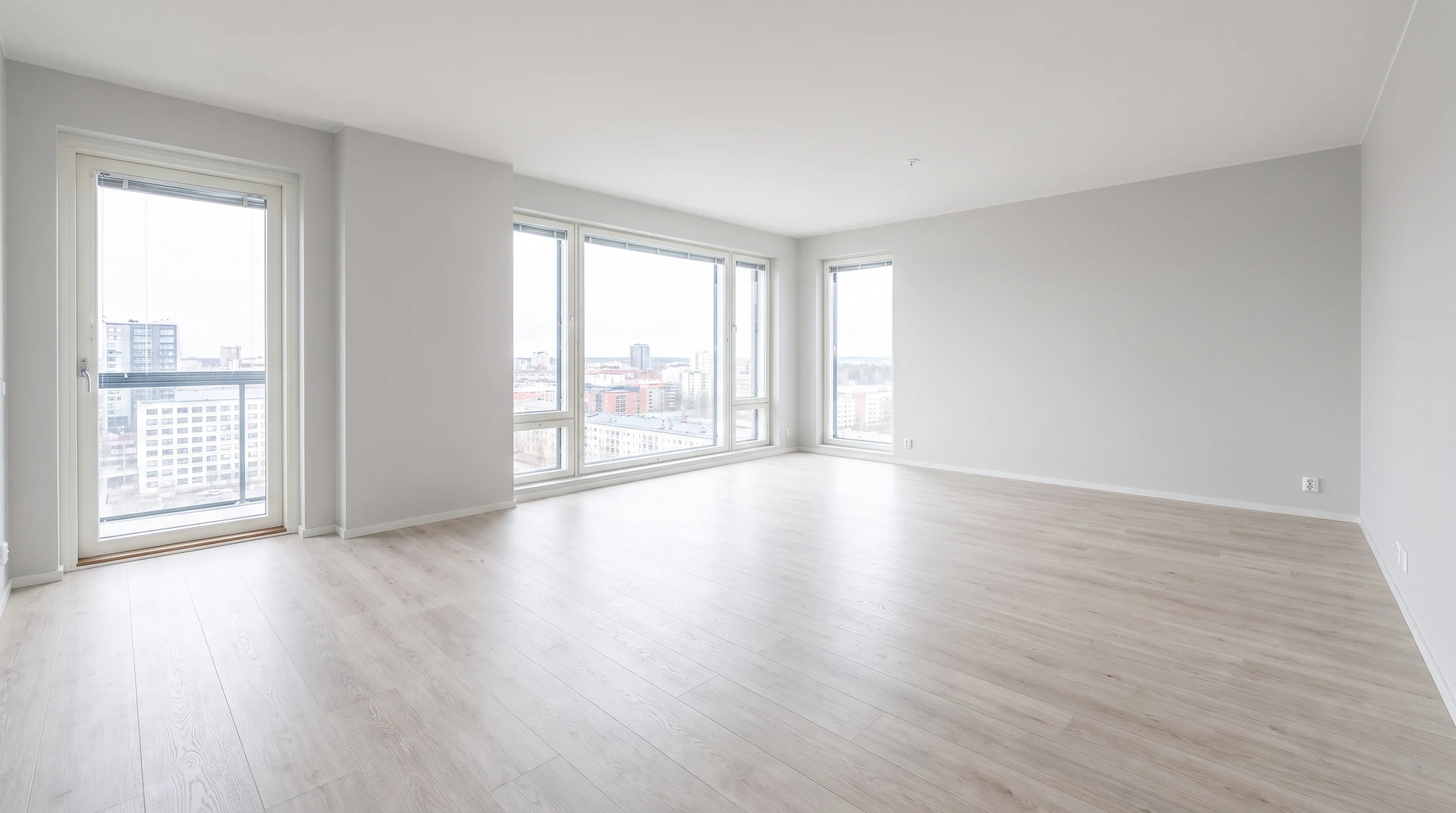
All six variants were generated in Clipia from a single photo of the empty room. Layout, windows and view are preserved — only the furnishing changes.
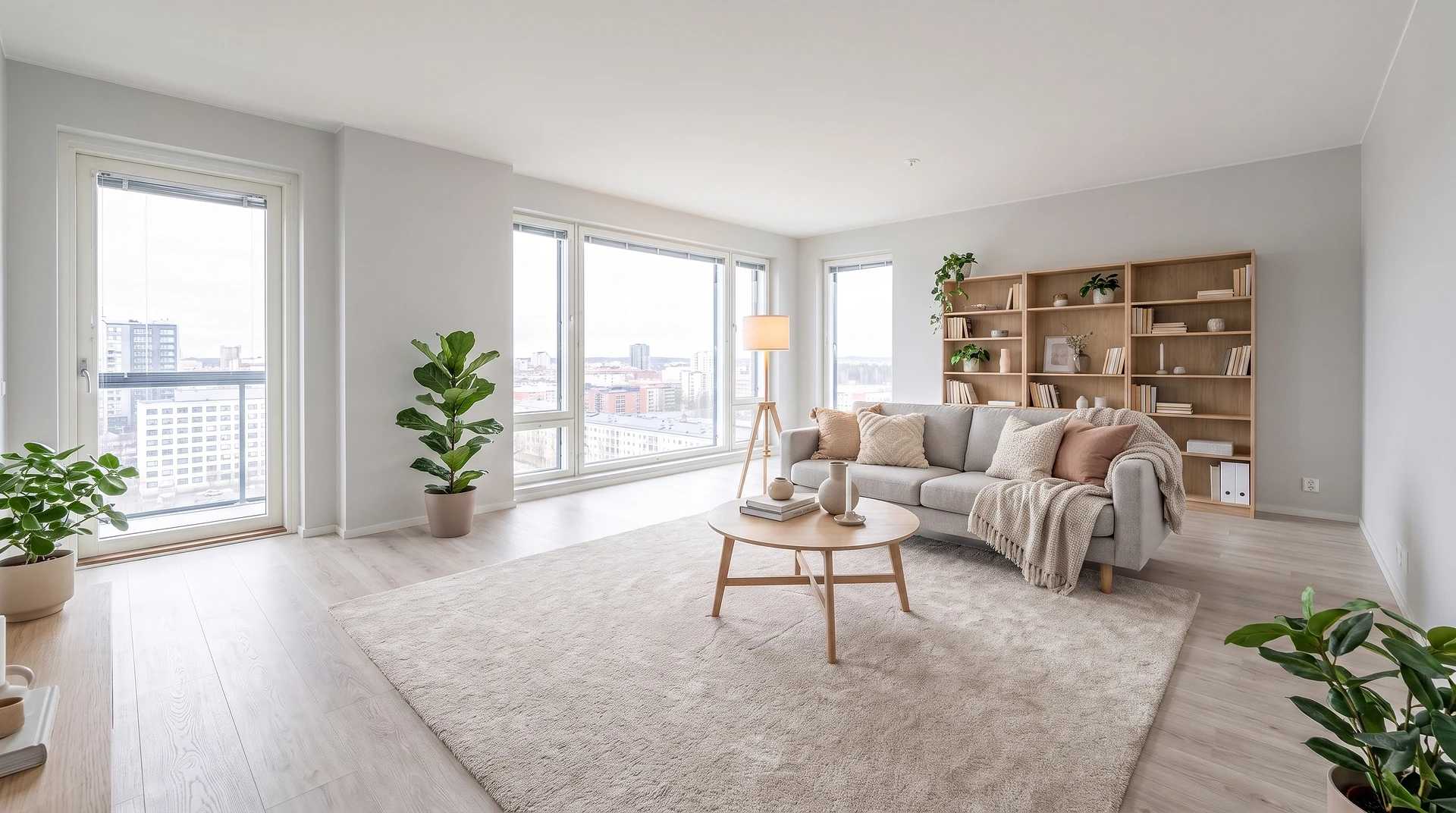
After: Scandinavian
Before: empty room
Before: empty roomAfter
Scandinavianlight, cozy
Modernminimalist
Loftbrick & wood
Classicelegant
Japandijapanese minimalism
Bohowarm & green
Video tour from a photo

A smooth fly-through of the furnished room — ready for listings and social media.

Furnish a room
Any room

Not just the living room

Living room, kitchen, bedroom and more — AI furnishes and restyles any room from a single photo.

Living room
Living roomfurniture, decor, style
Kitchen
Kitchencabinets, island, appliances
Bedroom
Bedroombed, textiles, light
Capabilities

Everything for property visuals in one place

From an empty shell to a finished listing with photo and video.

Virtual staging

Furnish an empty or worn apartment in the right style — buyers instantly see the potential.

from a photo

Interior design from a photo

Restyle a living room, kitchen, bedroom or bathroom — a renovation concept in different looks in one evening.

any room

Video tour from a photo

Animate a furnished frame into a smooth room fly-through for listings, reels and stories.

Property photo retouch

Light, perspective, removing clutter and people in reflections — the shot is ready to publish.

Change style and finish

Repaint walls, swap flooring and furniture, try several renovation options on a single photo.

Batch for catalogs

Process dozens of properties in a unified style — for an agency, developer or a curated set.

How it works

How to furnish a room with AI: three steps

No 3D editors or design skills needed — just a phone with a room photo.

  1. 01

    Upload a photo

    A shot of an empty or furnished room — straight from your phone, no studio.

  2. 02

    Pick a style

    Scandinavian, modern, loft, classic — or your own prompt in words.

  3. 03

    Get photo and video

    Receive the furnished room in the chosen style and, if you want, a video tour for the listing.

Who it's for

Who is AI for interior design for?

One tool covers visuals across different roles in real estate and interior design.

Realtors & agencies

Furnished photos and video tours boost listing click-through and speed up showings.

Interior designers

Fast concepts in several styles to agree on direction with the client before the contract.

Developers

Show the potential of empty new builds and layouts without an expensive on-site shoot.

Owners

Selling or renting yourself — make the listing stand out without a photographer.

Home stagers & decorators

Show the client several furnishing options before any real furniture is moved in.

Landlords

Short-term and long-term rentals: appealing shots and video raise demand for the unit.

Why Clipia

A tool you can rely on

Not a single-purpose service, but access to strong image and video generation models in one place.

20+AI models in one place
1 photoas input — AI does the rest
photo + videooutput for your listing
flexiblecredit-based, no extra subscription
More detail

AI for interior design and real estate

Clipia gives you access to strong image and video generation models in one place. Upload a room photo and get a furnished interior, a renovation concept or a video tour — the tasks of realtors, designers and owners are covered without an in-house designer or an on-site shoot.

AI interior design from a photo

AI interior design turns an ordinary room photo into a finished concept. Upload a shot of your living room, kitchen or bedroom — and get an interior in Scandinavian, modern, classic or loft style. Room design from a photo makes it easy to try several options on one space before spending the renovation budget.

Virtual staging for realtors and real estate

Virtual staging is digital furnishing of an apartment right on the photo, with no real furniture. AI for real estate furnishes an empty room with furniture and decor while preserving the layout, windows and angle — the property looks move-in ready. An empty apartment sells worse, while a staged frame gets more responses and replaces on-site home staging for the realtor.

AI furnishing for an empty apartment

AI furnishing lets you arrange furniture in an empty room right on the photo. Virtual furnishing picks a sofa, table, wardrobe and decor to match the room geometry and keeps the windows and layout intact. A buyer or renter instantly sees how to live in the space, and you can show one property in different setups for different clients.

AI design for kitchen, bedroom and living room

AI works with more than the living room. Kitchen design picks the cabinetry, island and appliances, bedroom design adds the bed, lighting and textiles, living room design brings furniture and decor in the chosen style, and bathroom design handles tile and fixtures. Any room is processed from a single photo, preserving the layout and angle.

AI for renovation: before-and-after visualization

AI for renovation shows the result before you even start. Upload a room photo — and AI visualizes new finishes, wall colors, flooring and furniture layout. A before-and-after renovation preview helps you align the concept with a designer or crew and avoid redoing finished work, while several styles generate in minutes and save on expensive 3D visualization.

Property photo editing for listings

Property photo editing with AI makes listing shots sell. You can improve apartment photos for a listing one by one or in batches for an agency catalog: fix perspective, lift the light and remove clutter. Dark, skewed and cluttered shots scare buyers away, while a clean, bright frame boosts responses.

Apartment video tour from a photo

From a furnished frame AI builds a smooth video fly-through of the room. An apartment video tour from a single photo brings the listing card to life: dynamic listings stand out on real estate platforms and in social feeds. The real estate video category is already growing — with Clipia it's available with no on-site shoot, from one photo.

Related Clipia tools
  • Animate a photo into video
  • AI image generator
  • AI video generator
  • AI models catalog

Frequently asked questions

About staging, styles and working with property photos

You can furnish an empty apartment with AI in a couple of minutes from a single photo. Step 1: photograph the room with your phone so the windows and corners are visible, and upload the shot to Clipia. Step 2: pick an interior style — Scandinavian, modern, loft, classic, japandi or boho — or describe your wishes in words. Step 3: AI analyzes the room geometry and places furniture, rugs, decor and textiles while preserving the layout, windows and camera angle of the original shot. Within seconds you get a photorealistic furnished frame you can download and add straight to a listing on your local property portals. A video tour of the room can be generated from the same frame. You don't need an on-site photographer, real furniture or design skills — just a photo of the empty space.

Virtual staging is the digital furnishing of an empty or dated room directly on a photo, without arranging real furniture. AI analyzes the room's geometry, window placement and light sources and adds furniture, decor and textiles in a chosen style. The layout, windows and angle stay unchanged — only the furnishing changes. Virtual staging is used by real estate agents, developers, home stagers and owners who want to show a property's potential before it is actually finished. Compared with on-site home staging — where real furniture is brought into the apartment for the shoot — the virtual option costs dozens of times less and takes minutes instead of days. On Clipia you just upload one photo and pick a style — Scandinavian, loft, japandi or classic. The result is a furnished frame and, if needed, a smooth video fly-through of the room.

Yes. AI works with your shot and preserves the room geometry, windows, doors and angle — only the furnishing changes. That matters for an honest listing: buyers see your actual apartment, not an invented one.

Yes, a video tour is built from a single photo. Step 1: upload a room photo — a regular phone shot works. Step 2: if needed, run virtual staging to add furniture and make the frame look lived-in. Step 3: choose the video tour option — AI animates the static frame into a smooth room fly-through with camera movement, preserving the interior and layout. Within minutes you get a short vertical or horizontal clip. Dynamic cards with video stand out in the feed and on property portals, as well as in reels and stories. Real estate video from a photo is a growing format, and on Clipia it is available with no on-site shoot or editing, from one image.

For a real estate agent, AI handles the property's visual prep for sale without a photographer or designer. Virtual staging furnishes an empty or worn apartment in the right style — buyers instantly see the potential and respond more readily. Photo enhancement fixes perspective, lifts the light and removes clutter, making the shots sell. A video tour from a photo adds motion to the card, and such listings stand out on property portals. One property can be shown in several styles for different buyers, and an agency can process dozens of units in a unified look for a catalog. All of this cuts listing prep from hours to minutes and saves on the on-site shoot and home staging that usually cost an agent a significant sum.

Scandinavian, modern minimalist, classic, loft, japandi, boho and others — pick a preset or describe your own style in words. It's handy to show one property in several interiors for different buyers.

Yes. Upload a room photo and get renovation concepts in different styles — a fast way to try finishes, wall colors and furniture layout before work starts and to agree on an option with the client.

No. You don't need 3D editors or design experience — a room photo from your phone is enough. The whole process takes a couple of minutes: upload a photo, pick a style, get the result.

Yes, the tool suits agency or developer workflows: process properties in a unified style for catalogs, curated sets and presentations.

Furnished photos and video tours work for real estate listing platforms, as well as social media and property presentations.

Yes, furnished frames and video tours can be published in sale and rental listings, on social media and in property presentations. Virtual staging stays honest to the buyer as long as the layout, windows and room geometry are preserved and only the furnishing changes — that is exactly how Clipia works. A good practice is to note in the listing that the photo shows a furnishing option, especially if the apartment is sold empty. That way buyers understand they see the potential of the space, not a finished renovation, and there are no false expectations at the viewing.

Classic Photoshop requires manual designer work: cutting out, choosing and fitting every piece of furniture with correct perspective and light — hours per frame. 3D visualization is even more expensive and slower: you build the scene from scratch in an editor, which is justified for design projects but overkill for a listing. Clipia's AI works differently — it analyzes your whole photo and adds a realistic interior directly onto the shot in seconds, preserving the original layout, windows and angle. No graphics-editor skills, modeling or rendering needed. For an agent, owner or a designer at the concept stage it is dozens of times faster and cheaper, and the result is a photorealistic frame ready to publish.

Generation is paid with your Clipia account credits — you pay for specific images and videos, without a subscription to a separate service. See the tariffs page for current pricing and the starter pack.

Ready to try

Furnish a room and build a video tour

Upload a property photo and get a furnished interior and a listing video today.

Furnish a roomSee tariffs
Furnish a room
AI for Interior Design & Real Estate | Clipia.ai