
AI for events and event planners
Show the decorated venue before the event, build the poster, invitations and a promo video — from a venue photo or a brief. No on-site shoot, no designer, in one evening.
- 1 photo
- of the venue as input
- 10+
- styling looks
- photo + video
- for event promo
Why can't the client picture the event?
A clear styling concept and moodboard help the client imagine the event — so they approve the budget, style and venue faster.
Venue styling from a photo
Upload a photo of the empty venue and AI adds decor, lighting, florals and table settings while keeping the layout and angle.
Poster and event promo
Concert poster, show artwork, banners and social covers — in a single event style, from a brief.
Event promo video
Build an atmospheric clip of the styled venue — for a reels, stories and guest announcement.
Moodboard in an evening
Assemble the event concept in several variants to agree on a direction with the client before any purchases.
Clients see the result
A clear visualization helps the client picture the event and approve the budget and styling faster.
Save on prep
No trial decor setup or on-site shoot — prepare the event concept cheaper and faster.
Empty venue — finished styling
All six styling variants were built in Clipia from a single photo of the empty venue. Layout and angle are preserved — only the decor changes: florals, lighting, textiles and table settings.
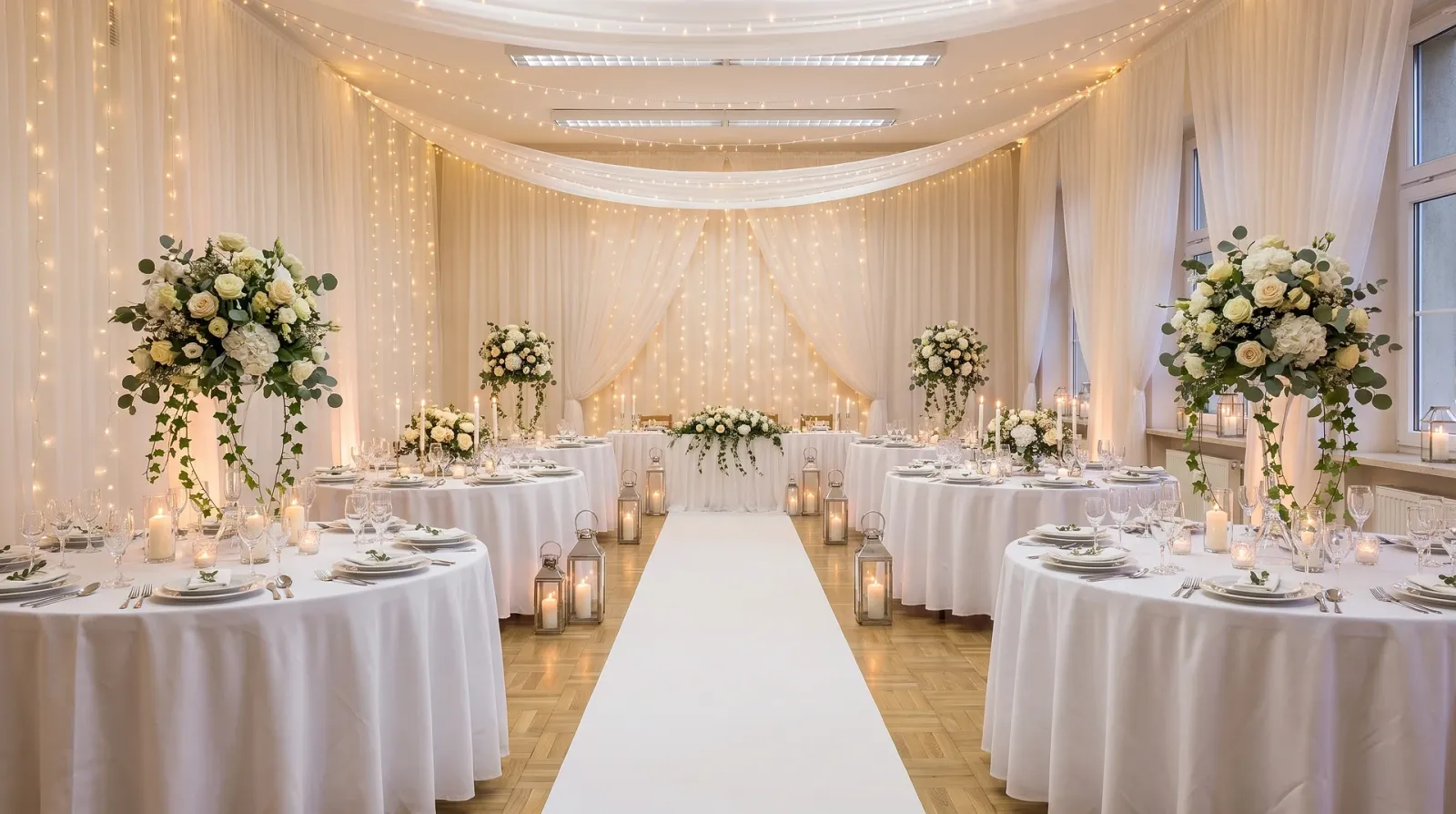 Before: empty venueAfter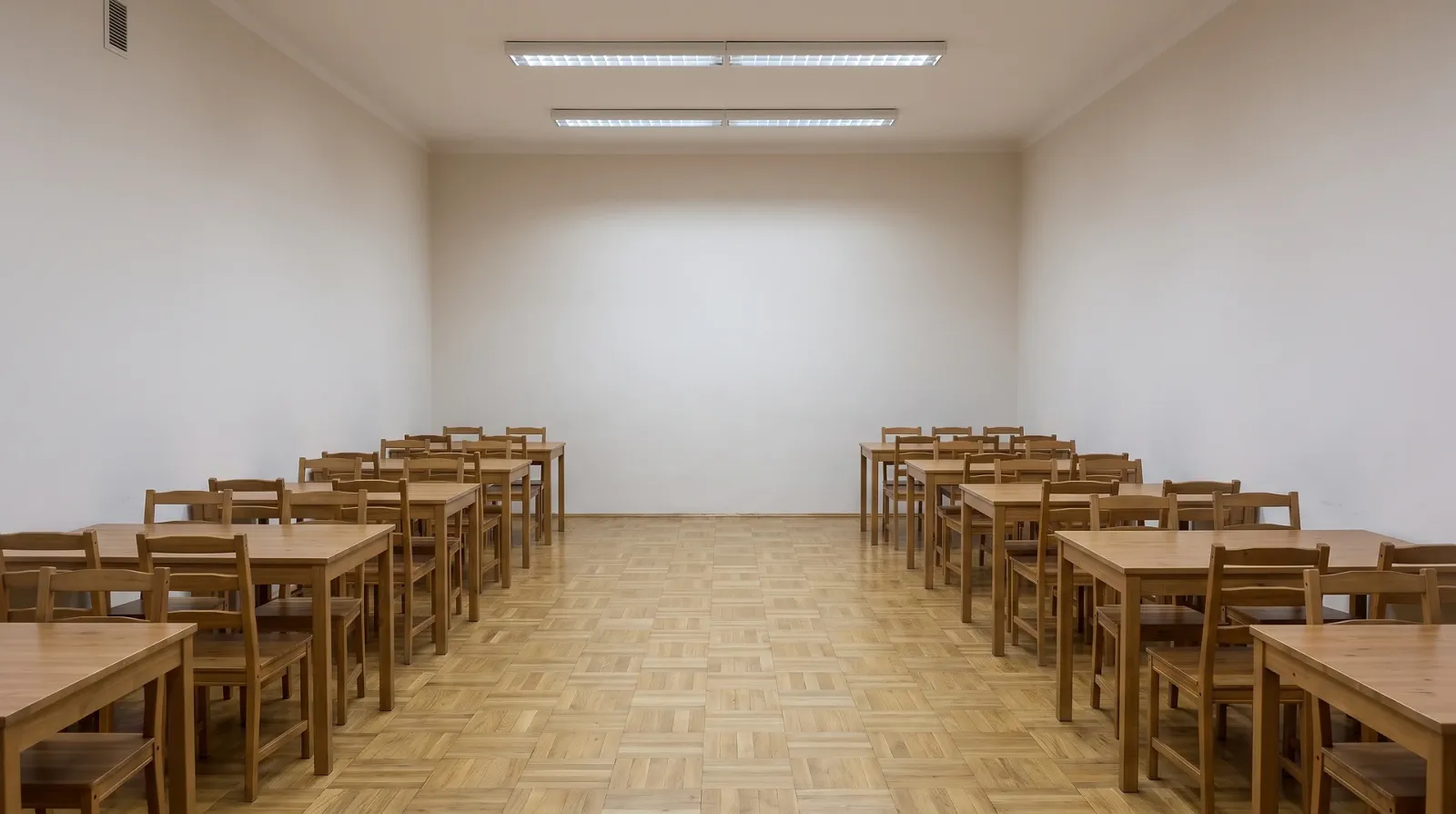
A smooth walk-through of the styled venue — ready for event announcements on social media and guest mailouts.
Style an eventNot just venue styling
Posters, invitations and the event concept — AI builds all the event visuals in one place, from a venue photo or a brief.


Every event visual in one place
From an empty venue to finished promo: styling, poster, invitations and video.
Venue styling
Show the venue decorated for a wedding, anniversary, concert or corporate event — from a single photo of the empty space.
Posters and promo layouts
Concert poster, show artwork, banners and social covers in a single event style — from a brief.
Event promo video
Animate the styled frame into an atmospheric venue clip for announcements, reels and stories.
Invitations and print
Assemble invitations, seating charts and print decor in the event style.
Concept and moodboard
Several concept and moodboard variants in an evening — to agree on the style with the client.
Batch for the venue
Style dozens of halls and formats in a unified look — for an agency, banquet hall or venue.
How to style an event with AI: three steps
No 3D editors or designer needed — just a venue photo or a description of the event.
- 01
Upload a venue photo
A shot of the empty hall or venue from your phone — or simply describe the event in words.
- 02
Pick a format and style
Wedding, concert, birthday, corporate — or your own concept in words.
- 03
Get the visuals
Receive the styled venue, poster, invitations and, if you want, an event promo video.
Who is AI for events for?
One tool covers visuals across different roles in the event industry.
Event agencies
Fast concepts and promo for every pitch — show the client the idea before purchases and set-up.
Event planners
Visualize the styling to agree on the budget, look and venue with the client.
Wedding planners
Build a wedding moodboard, ceremony and banquet styling and invitations in a single style.
Decorators and florists
Show decor and floral options right on the venue photo before any real setup.
Banquet halls and restaurants
Show the hall in different event formats — wedding, anniversary, corporate — without a shoot for each.
Corporate event managers
Conference and corporate styling, posters and event promo for the team and partners.
A tool you can rely on
Not a single-purpose service, but access to strong image and video generation models in one place.
AI for events and event planners
Clipia gives you access to strong image and video generation models in one place. Upload a venue photo or describe the event — and get styling, a poster, invitations, a moodboard and a promo video. The tasks of event agencies, planners and venues are covered without a separate designer or an on-site shoot.
AI for events
AI for events covers all the event visuals in one place: venue styling, the poster, invitations and a promo video. Upload a venue photo or describe the event — and get a concept for a wedding, concert, birthday or corporate event.
AI venue styling and decoration
AI venue styling shows what the banquet will look like before any decor is set up. Upload a photo of the empty hall — and AI adds florals, lighting, textiles and table settings while preserving the layout and angle.
AI poster for events and concerts
From an event brief, AI can help establish the visual direction for a concert, show or celebration poster. After generation, verify the date, venue, participant names and print requirements, then adapt the chosen visual for social media, screens and print.
Event promo video and styling
From a styled frame AI builds an atmospheric event promo video. The event styling comes to life in a short venue clip or celebration announcement — for reels, stories and guest mailouts.
Frequently asked questions
About venue styling, posters, concepts and working with a venue photo
You can show venue styling before the event with AI in a couple of minutes from a single photo. Step 1: photograph the empty hall or venue with your phone so the walls, windows and overall volume of the space are visible, and upload the shot to Clipia.
For an event planner, AI covers all the event visuals without a separate designer or decorator at the idea stage. Venue styling from a photo shows the client the atmosphere of the celebration before set-up: florals, lighting, textiles and table settings for a wedding, anniversary or corporate event.
Yes. From an event brief, AI builds a concert or celebration poster, banners and social covers, as well as invitations, seating charts and print decor in a single style.
Yes. AI works with your shot and preserves the venue geometry, windows, columns and angle — only the decor changes: styling, lighting, florals and table settings.
The AI visualization is a concept and moodboard for approval, not an exact copy of the future set-up. AI shows the atmosphere, palette, floral style and presentation of the venue, but the specific furniture models, flower varieties and number of guest seats are chosen during real preparation together with vendors.
Yes, that is exactly what AI is handy for: showing the client a styling concept before purchases and set-up. Present the visual as a concept proposal and moodboard — a clear idea of the celebration, not a photo report from a finished event.
Yes. From a styled frame AI builds a short atmospheric clip — a smooth walk-through of the venue or a celebration announcement.
It depends on your plan: Basic is for personal, non-commercial use, Standard covers publishing on websites, social media and in ads, while Pro and Ultima include an extended commercial license. You must also hold the necessary rights to source material, brands and identifiable people.
Generation is paid with your Clipia account credits — you pay for specific images and videos, without a subscription to a separate service. See the tariffs page for current pricing.
Style the venue and build event promo
Upload a venue photo or describe the celebration — get the styling, poster and promo video today.