How to Make an AI Voice Over: 8 Audio Tasks, Step by Step (2026)
Voiceover, music, transcription, voice-preserving translation, subtitles, audiobooks by chapter, voice cloning and noise cleanup — with credit prices
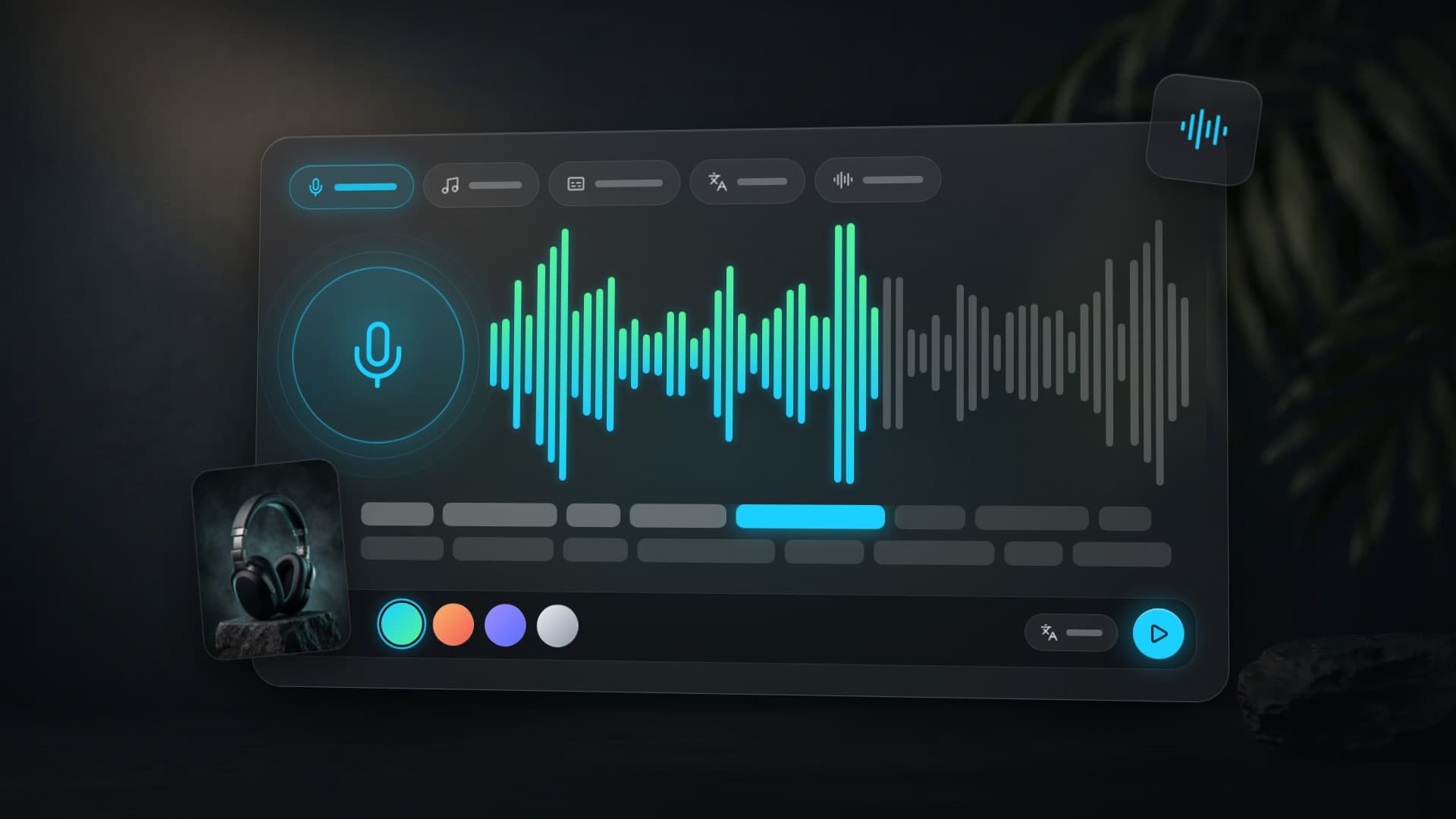
The narrator is sick, the microphone hisses, and the video is due today. That used to mean moving the shoot. Now it means five minutes in a browser. To make an AI voice over, paste your script into the Voiceover tab, choose a model and a voice, and press Create voiceover — the finished MP3 or WAV track is ready in about a minute. But voice-over is only one of eight jobs in Clipia's audio studio. The same page writes music, transcribes recordings, translates clips and cleans up sound. Here is how to do each one and what it costs in credits.
Quick answer: which tab does what
| What you need | Tab | What you upload or write | Price |
|---|---|---|---|
| A narration track | Voiceover | The script text | from 4 credits per 1,000 characters |
| A song or a music bed | Music | Genre, mood and instruments | from 5 credits per track |
| Text from a recording | Transcription | Audio or video up to 10 MB | from 12 credits per hour |
| A clip in another language | Translation | Audio or video with speech | from 35 credits per minute |
| A subtitle file | Subtitles | Audio or video with speech | from 12 credits per hour |
| An audiobook or a course | Long-form | Text by chapter, up to 50,000 characters | from 7 credits per 1,000 characters |
| Narration in your own voice | Voices | 1–2 minutes of your speech | from 30 credits per voice |
| A recording without noise | Cleanup | MP3, WAV or M4A up to 10 MB | from 9 credits per minute |
Prices are as of October 13, 2026. The exact amount is on the button before you start: it is counted from the length of the text or the recording.
What is an AI audio studio?
The Clipia audio studio is one page for everything that involves sound. Its tabs fall into two groups. The first creates sound from text: Voiceover, Music, Long-form and Voices. The second works on a recording you already have: Transcription, Translation, Subtitles and Cleanup.
Every tab has an example you can play before running anything: the source on the left, the result on the right and three steps below. Finished tracks are kept in My tasks, and the Use in… menu passes a result to a neighboring tab or to the video studio — a voice-over into Talking photo, for instance.
1. How to make an AI voice over from text
Best for: narration for a clip, voiced slides and lessons, an announcement, an audio guide, lines for a podcast.
Step 1. Paste the script
The model reads the text literally, so write it the way it should sound. Spell out numbers, expand abbreviations, and write unusual names and brand words phonetically if they tend to come out wrong.
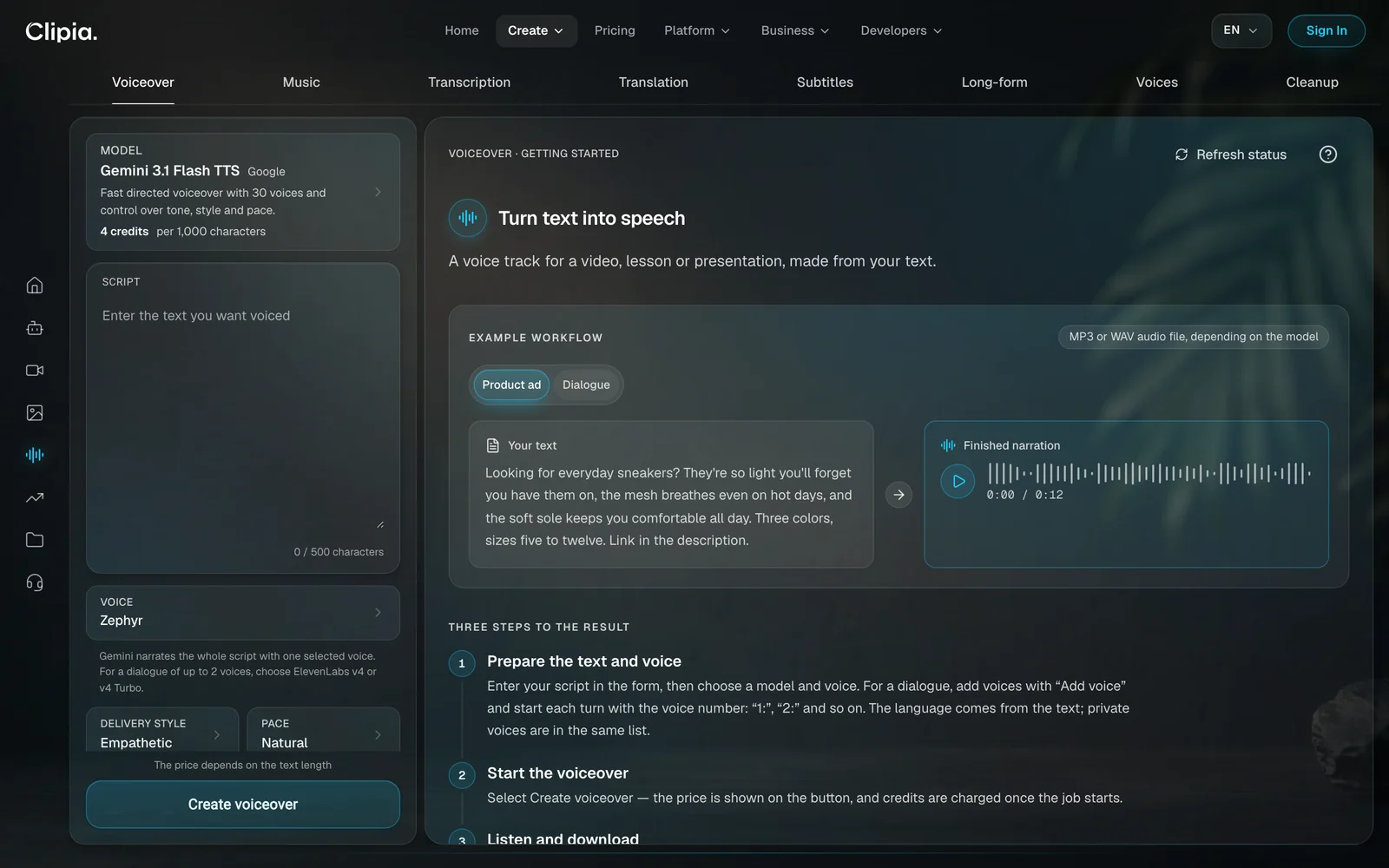
Looking for everyday sneakers? They're so light you'll forget you have them on, the mesh breathes even on hot days, and the soft sole keeps you comfortable all day. Three colors, sizes five to twelve. Link in the description.
The script determines the language of the narration, so there is nothing to select.
Step 2. Choose a model and a voice
The default is Gemini 3.1 Flash TTS by Google: 30 voices, 4 credits per 1,000 characters, up to 500 characters per request. It lets you set the delivery style and pace — Empathetic and Natural, for example. For a script longer than 500 characters, switch to ElevenLabs v4 or v4 Turbo: both take up to 10,000 characters per request.
Step 3. Press Create voiceover
The price is on the button and depends on the text length. You can play the finished track and download it as MP3 or WAV, depending on the model.
How to voice a dialogue with different voices
Dialogue is voiced by ElevenLabs v4 and v4 Turbo: the first is more expressive, the second is faster and suits drafts. Add voices with the Add voice button and start each line with the voice number.
1: Have you seen the new coffee shop on the corner? 2: I have. People say it makes the best flat white in the neighborhood. 1: Then let's go and find out. My treat.
2. How to create a song or background music
Best for: a music bed for a clip, a podcast jingle, a channel intro, a gift song with your own lyrics.
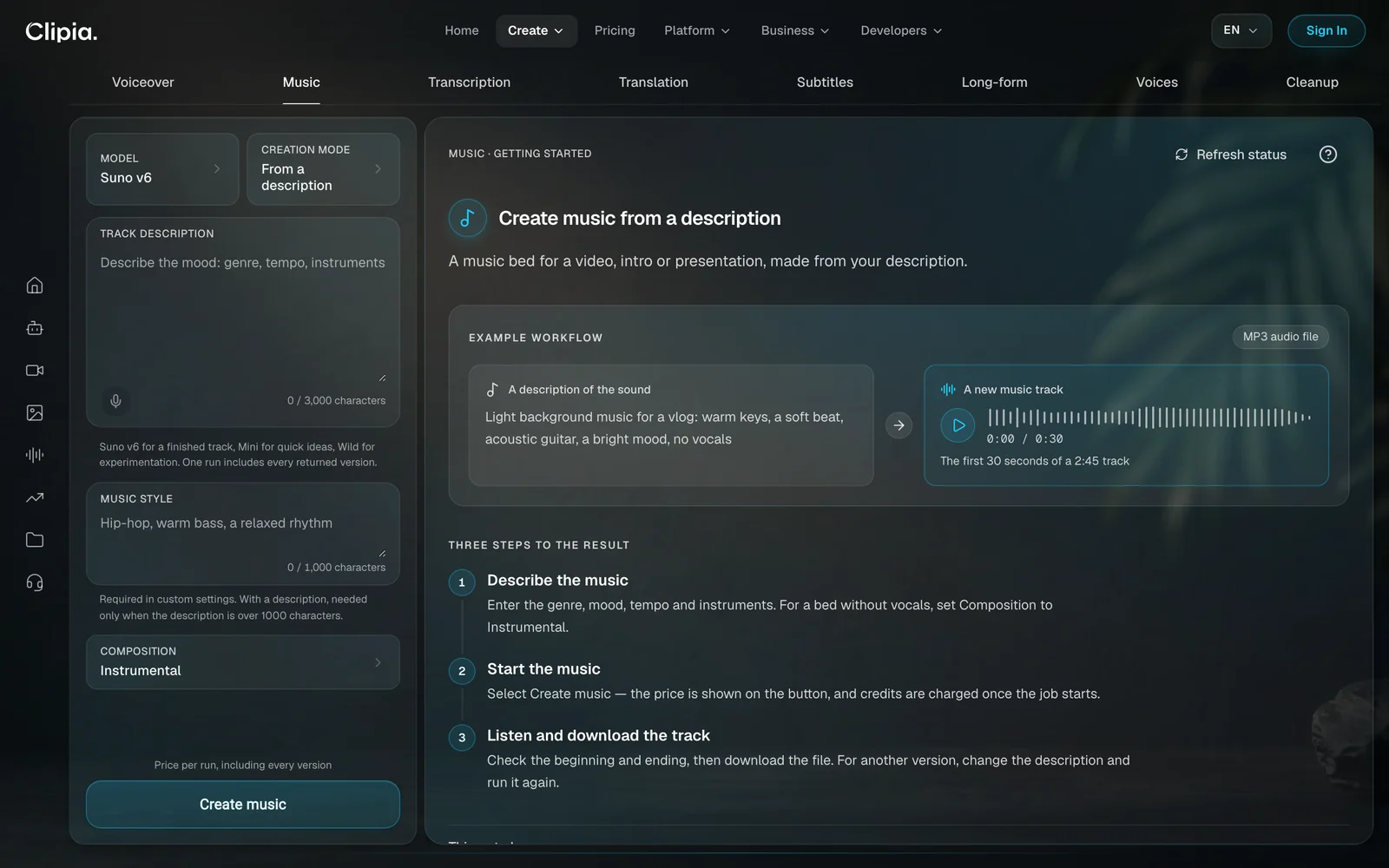
In the Music tab, tracks are written by Suno v6. The Mini version is for quick ideas and Wild is for genre experiments. The price starts at 5 credits per track, whatever its length, and one run includes every returned version.
From a description
Describe the genre, tempo, instruments and mood, and the model picks the lyrics and length itself. For a bed without vocals, set Composition to Instrumental.
Light background music for a vlog: warm keys, a soft beat, acoustic guitar, a bright mood, no vocals
Custom settings
Here you control everything: lyrics of up to 5,000 characters, a style of up to 1,000, a title, and a length from 10 to 360 seconds. Mark the parts of your lyrics with tags — [Verse], [Chorus], [Bridge] — so the model knows where to repeat the chorus and where to change the mood. In the Exclude field, list what should not be in the track, such as “electric guitar, autotune”.
| Weak prompt | Strong prompt |
|---|---|
| Beautiful music for a video | Lo-fi hip hop, slow tempo, warm bass, vinyl crackle |
| Something energetic | Eighties synthwave, booming drums, female vocals |
| A sad song | Acoustic ballad, piano and cello, quiet male vocals, slow |
One rule covers all of it: name the sound, not the feeling.
3. How to turn audio into text
Best for: meeting notes, an interview transcript, an article from a webinar, a long voice message.
The Transcription tab takes audio or video: MP3, WAV, M4A, MP4, WEBM, OGG or OPUS up to 10 MB. It runs on Scribe v2 by ElevenLabs: 101 languages, timestamps and speaker labels.
- Upload the recording. The studio detects the spoken language itself.
- Press Transcribe. The price follows the length: from 12 credits per hour of audio.
- Fix the text and timestamps right in the studio, press Save changes and download TXT, SRT or VTT.
4. How to translate a video and keep the voice
Best for: a clip for viewers abroad, a lesson in another language, a product review for buyers in other countries.
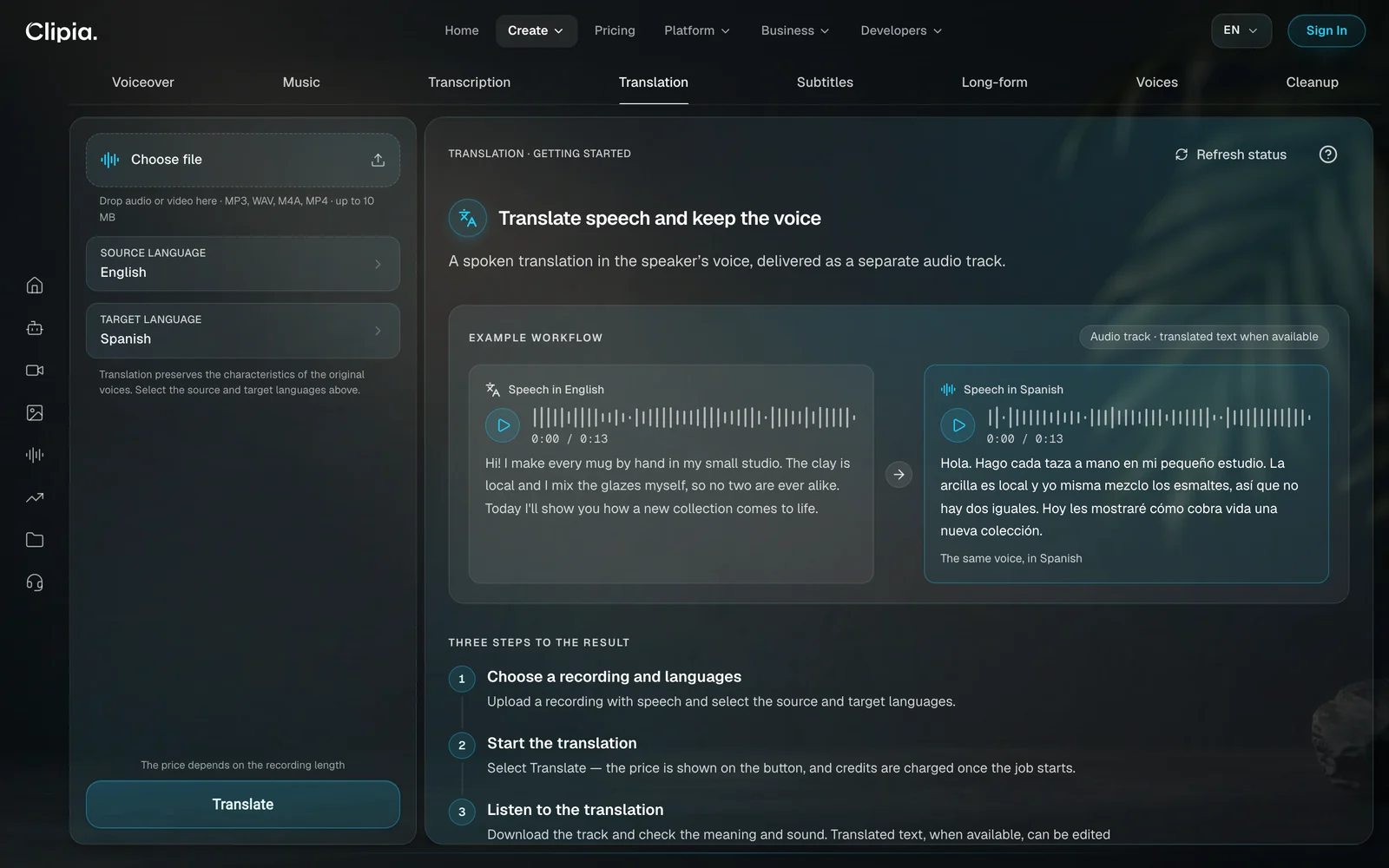
The Translation tab translates the speech and voices it in the original speaker's voice. It runs on Dubbing v1 by ElevenLabs and supports 86 languages.
- Upload a recording with speech: MP3, WAV, M4A or MP4 up to 10 MB.
- Select the source language and the target language.
- Press Translate and download the finished audio track.
The price starts at 35 credits per minute, and each language is a separate run. Three things are worth knowing in advance:
- The result is an audio track, not a video. Lay it over the clip in your video editor.
- Editing the translated text does not re-voice the track. To change how it sounds, run the translation again.
- One language per recording. If two languages are spoken in a clip, split it and translate each part separately.
5. How to make subtitles for a video
Best for: social clips watched with the sound off, lessons and webinars, captions to upload to a video platform.
The Subtitles tab runs on the same Scribe v2 model and costs the same: from 12 credits per hour of audio. The difference is the output. Transcription gives you text; Subtitles gives you a file of short segments with exact timing for each.
- Upload a video or audio file up to 10 MB.
- Press Create subtitles.
- Refine the text, start and end of each segment, save your changes and download SRT or VTT.
SRT works with almost every video editor and platform, while VTT is usually needed for a web player. Subtitles are made in the language of the recording and are not burned into the video automatically: you attach the file in an editor or upload it to the platform along with the clip.
6. How to narrate a book or a course by chapter
Best for: an audiobook, audio lectures for an online course, staff instructions, a podcast from a finished script.
The Long-form tab is built for volume: up to 20 chapters, up to 10,000 characters each and 50,000 in total. The narrator is ElevenLabs v4 at 7 credits per 1,000 characters.
- Add chapters, give them titles and paste in the text.
- Choose a voice, from the library or your own. Adjust Delivery and Voice similarity.
- Press Voice chapters. The chapters are voiced in order and joined into one MP3 track.
If one chapter fails, the finished ones are kept and the failed one can be retried on its own, without voicing the rest again. One voice reads the whole text; a dialogue with roles belongs in the Voiceover tab.
7. How to clone your own voice
Best for: voicing clips in your own voice without recording, an audiobook in your own timbre, replacing one line in a finished clip.
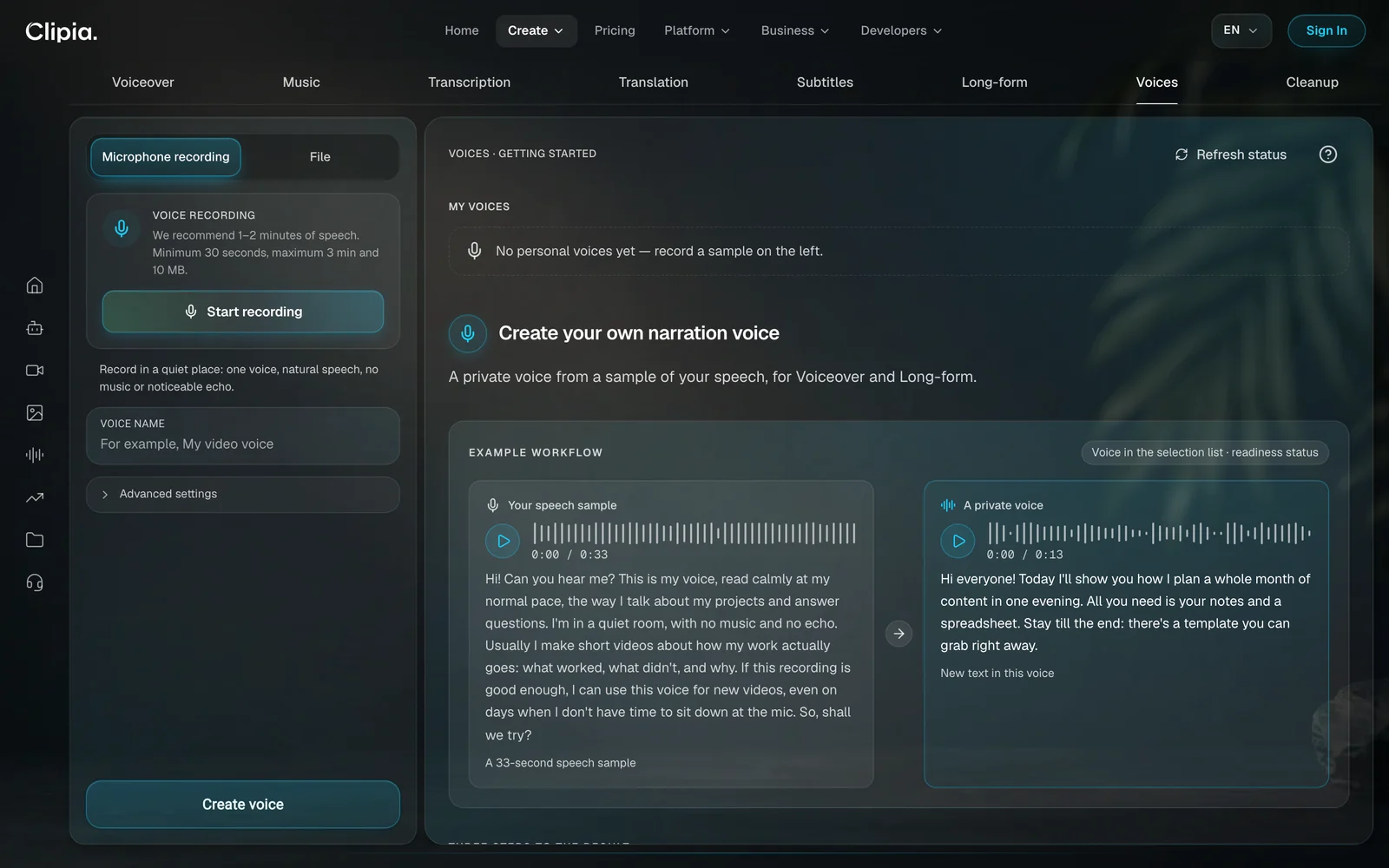
In the Voices tab, a private voice is created from a sample of your speech. It runs on Instant Voice Cloning by ElevenLabs, from 30 credits per voice. Narration with the finished voice is charged separately at the chosen model's price.
- Record a sample with the microphone or upload a file. One to two minutes of calm speech is ideal and 30 seconds is the minimum. A microphone recording can run up to 3 minutes, a file up to 5 minutes and 10 MB.
- Name the voice and confirm all three consent statements.
- Press Create voice. The finished voice appears in the voice list of Voiceover and Long-form.
You can clone only your own voice, and you confirm that with the consents before the voice is created. The voice is available only to you.
The quality of the sample matters more than its length:
- The room matters more than the mic. A ringing echo ruins a sample more than a simple microphone does. Record in a small furnished room with curtains.
- Read in the manner you need. The voice picks up the delivery of the sample, calm or energetic.
- No music and no effects. The model will treat them as part of the voice.
8. How to remove background noise from audio
Best for: a street interview, narration recorded at home, a lecture from a hall, preparing a recording for transcription.
The Cleanup tab takes an MP3, WAV or M4A audio file up to 10 MB. Voice Isolator by ElevenLabs separates the speech and removes the rest: wind, air-conditioner hum, traffic. There is no strength setting to adjust. The price starts at 9 credits per minute of audio.
After processing, compare the original and cleaned tracks and download the one you prefer. Keep three things in mind:
- Music counts as background. Cleanup removes it too. If you need a music bed, add it back afterwards.
- The tab does not accept video. Save the audio track as a separate file first.
- What is lost stays lost. A phrase fully drowned out by noise becomes cleaner, not clearer.
Which AI voice model should you choose?
| Model | Best for | Limit per request | Price per 1,000 characters |
|---|---|---|---|
| ElevenLabs v4 | Expressive narration with emotion; multi-voice dialogue | up to 10,000 characters | from 7 credits |
| ElevenLabs v4 Turbo | Fast narration and drafts | up to 10,000 characters | from 4 credits |
| Gemini 3.1 Flash TTS (Google) | Short lines with control over style and pace; 30 voices | up to 500 characters | from 4 credits |
| Gemini 2.5 Pro TTS (Google) | A final cut with precise delivery control | up to 500 characters | from 4 credits |
In short: a short clip goes to Gemini, a long script or a dialogue goes to ElevenLabs, and a book goes to Long-form. For a closer look at the voices, see the ElevenLabs v4 review.
How to build the sound for a clip: a four-step route
The tabs work as a chain. A typical route for a short clip looks like this:
- Voiceover — 15 to 30 seconds of narration.
- Music — an instrumental bed that matches the mood.
- Subtitles — an SRT file for people watching with the sound off.
- Translation — a track in Spanish, or any other language your audience speaks.
The clip itself is assembled in the video studio; the steps are in the AI video guide. If you need a video that comes with sound from the start, see photo to video with sound.
How many credits does AI audio cost?
| Action | Model | Price |
|---|---|---|
| Text to speech | Gemini 3.1 Flash TTS, ElevenLabs v4 Turbo | from 4 credits per 1,000 characters |
| Expressive narration and dialogue | ElevenLabs v4 | from 7 credits per 1,000 characters |
| A song or an instrumental | Suno v6 | from 5 credits per track |
| Transcription and subtitles | Scribe v2 | from 12 credits per hour of audio |
| Voice-preserving translation | Dubbing v1 | from 35 credits per minute |
| Narration by chapter | ElevenLabs v4 | from 7 credits per 1,000 characters |
| A private voice | Instant Voice Cloning | from 30 credits per voice |
| Audio cleanup | Voice Isolator | from 9 credits per minute |
New accounts get 5 welcome credits, enough for a short voice-over. After that, plans start from $10 per month, and the Basic plan includes 240 credits. Credits are charged once a job starts, and the amount is visible on the button beforehand.
Common mistakes and how to fix them
- Leaving numbers and abbreviations as they are in the document. A model may read “280 g” in more than one way. Write “two hundred and eighty grams”.
- Voicing the whole script before choosing a voice. Test on a paragraph first, then run the full text.
- Pasting 3,000 characters into Gemini. Its limit is 500 characters. For a long text, use ElevenLabs or Long-form.
- Uploading a full video to Transcription. It hits the 10 MB limit. Save the audio only.
- Expecting a finished video from Translation. The result is an audio track. Lay it over the clip in an editor.
- Cleaning a recording whose music you want to keep. Cleanup keeps the speech and nothing else.
- Recording a voice sample in an empty room. The echo becomes part of the voice. Use a furnished room.
More on AI audio, video and images
- How to make AI videos: 6 ways, step by step — where the finished voice-over and music go.
- How to use an AI image generator: 5 ways — a podcast cover or the first frame of a clip.
- Clipia update: three task-based studios — what changed on October 12, 2026.
Frequently asked questions
How do I make an AI voice over?
Paste your text into the Voiceover tab, choose a model and a voice, and press Create voiceover. The finished track appears in the result area, ready to play and download as MP3 or WAV.
How much does an AI voice over cost?
From 4 credits per 1,000 characters with Gemini 3.1 Flash TTS or ElevenLabs v4 Turbo, and from 7 credits with ElevenLabs v4. The amount is shown on the button before you start.
How do I make an AI voice sound more human?
Write the script the way people speak: short sentences, numbers spelled out, pauses marked with punctuation. Choose an expressive model such as ElevenLabs v4, or set the delivery style and pace in Gemini, and compare two or three voices on one paragraph before voicing the whole text.
Can I make a voice over in my own voice?
Yes. Create a private voice in the Voices tab from a speech sample of at least 30 seconds. Once it is ready, it appears in the voice list of Voiceover and Long-form.
Can I clone someone else's voice?
No. The studio accepts only your own voice, and you confirm three consent statements before it is created.
How do I voice a dialogue with different voices?
Choose ElevenLabs v4 or v4 Turbo, add voices with the Add voice button and start the lines with the voice number: “1:”, “2:”. Each line is read by its own voice.
How do I make a song with AI?
In the Music tab, describe the genre, mood, tempo and instruments, choose With vocals or Instrumental and press Create music. Your own lyrics go into Custom settings.
How do I translate a video into another language in the same voice?
In the Translation tab, upload the recording, select the source and target languages and press Translate. You get an audio track in the speaker's voice, which you lay over the video in an editor.
What is the difference between transcription and subtitles?
Transcription returns the text of a recording with speaker labels, for notes and articles. Subtitles returns an SRT or VTT file of short timed segments, for video editors and platforms.
Can I use an AI voice for YouTube videos?
The finished tracks download as files that you can place in your own videos. Before commercial use, check the service's terms and the rules of the platform where you publish, including its rules on labeling AI-generated content.
Try it yourself on Clipia
60+ models for video and image generation. One account, transparent pricing.