
Turn a Product Photo Into a Video Ad With AI
A product-fidelity workflow for controlled motion, editable offers, placement variants, and frame-by-frame review

To turn a product photo into a video ad with AI, keep the product image as the source of truth, generate one short motion shot, and add the hook, offer, price, and call to action as editable layers afterward. This split gives the video model a focused job: move the camera, light, background, or one simple interaction without redesigning the item being sold. Review every generated frame for silhouette, label, color, material, accessories, and pack count before you publish the ad.
Quick answer: turn one product photo into a video ad
- Choose a sharp product photo that shows the whole item and leaves room for movement.
- Pick one ad shot: a slow orbit, macro push-in, controlled light sweep, use-in-context action, or background reveal.
- Write a prompt that locks the product identity and describes only one camera move and one product action.
- Generate a short image-to-video clip and inspect frames for product drift.
- Add the verified offer, price, disclaimer, captions, and CTA in an editor, then export separate placement variants.
This is more reliable than asking one model to animate the product, invent a scene, spell a discount, place a button, and preserve small packaging text in a single pass. The motion shot can be regenerated without rebuilding the offer, while the offer can be corrected without paying for another product animation. Ready-made ad scenarios and shot examples are collected on the AI for advertising page.
Open the Clipia video studio, upload the product image, and start with one restrained five- or six-second motion test.
What makes a product-photo video ad different
A general image-to-video clip is judged mainly by whether the motion looks convincing. A product ad has an additional constraint: the object in every frame must still be the item a customer can buy. A cinematic bottle with the wrong cap, a shoe with a changed sole, or a device with an invented port may look polished while communicating false product information.
That is why product fidelity comes before visual spectacle. In this workflow, product fidelity means that the generated video preserves the identifying and material details visible in the approved source: overall silhouette, dimensions, color, logo position, printed label, closures, controls, included accessories, surface finish, and number of units. Not every detail needs to remain perfectly readable during motion, but the model must not replace it with another design.
The safest production architecture has three distinct layers:
- Source layer: the approved packshot or product photograph, plus separate logo and offer assets.
- Motion layer: a short image-to-video shot with camera movement, lighting change, environmental motion, or one simple interaction.
- Ad layer: editable hook, product benefit, evidence, offer, price, disclaimer, subtitles, and CTA.
This division also aligns with advertising review. The generated shot communicates attention and context. The editable layer carries claims that a marketing or legal reviewer may need to change. If a discount expires tomorrow, you replace the overlay rather than regenerate the product.
Prepare a source photo that can survive motion
The source frame determines what the video model can preserve. A clean photo does not need to be sterile, but it must make the product boundaries unambiguous. Use the highest-resolution original you have, avoid compression artifacts around the label, and keep important edges inside the crop.
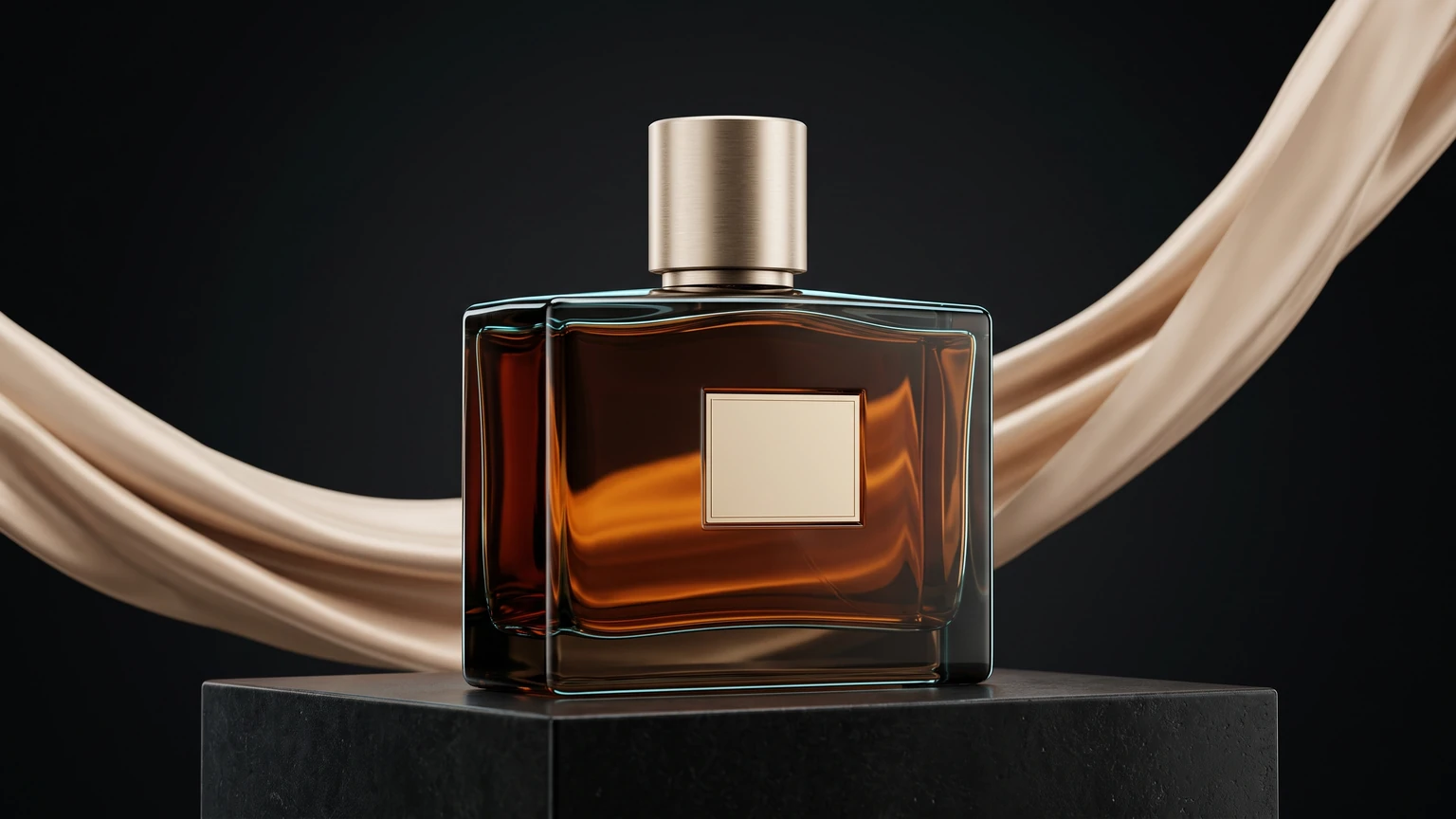 Clean product source-frame example
Premium glass perfume bottle with a gold cap on black marble, three-quarter product angle, soft diffused key light and restrained rim light, dark background, sharp product focusThe same bottle animated from that frame: the camera moves around the product, the fabric behind it drifts, while the object and its label stay unchanged. An 8-second clip with sound, taken from the AI for advertising page.
Source-photo checklist
- Show the sellable item clearly. The main product should not be hidden behind props, hands, glare, or dense typography.
- Leave movement allowance. For a rightward camera slide, leave composition space on the right; for an orbit, reveal enough depth for the model to infer volume.
- Keep the label legible. If the name is already blurred in the source, generation will not reliably reconstruct it.
- Avoid contradictory reflections. Several hard reflections can make the model treat one cap or edge as multiple objects.
- Use a complete packshot for accuracy. A dramatic crop is useful as a second source, but it should not be the only approved reference when shape matters.
- Separate claims from the photo. Save the price, discount, CTA, disclaimer, and campaign headline as editable text assets.
Google Merchant Center’s current product-data specification provides a useful accuracy baseline even when the final asset is a video: the primary image should accurately display the product, while additional images may include staging and show the product in use. A social ad can use contextual staging, but the product’s identity, variant and visible features should remain unambiguous.
Five product-ad shot patterns that work from one image
1. Slow orbit or turntable shot
A small camera orbit creates depth without asking the item to perform a complex action. It works well for watches, bottles, shoes, electronics, accessories, and packaged goods. Keep the angle modest when only one product view is available. A full rotation asks the model to invent unseen surfaces; a 15- to 25-degree orbit usually requires less reconstruction.
The camera slowly orbits a luxurious mechanical watch floating in zero gravity, water droplets drifting around it, each droplet catching the light, an extreme close-up reveals the intricate tourbillon, then the camera pulls back as the watch rotates, cinematic studio lightingCopy-ready controlled version:
The product remains identical to the source image. The camera makes a slow 20-degree orbit while a narrow studio highlight travels across the material. Preserve silhouette, label, logo, color, cap, seams, and every accessory. No new text, no extra objects, no morphing.
The example above demonstrates how orbit, macro detail, and environmental particles can create a premium product reveal. For a real catalog item, reduce any element that hides the label or causes reflections to cross an important claim.
2. Macro push-in and material reveal
A macro push-in is the conservative choice when texture is the selling point. The product can stay nearly still while focus, camera distance, and a controlled highlight reveal metal, glass, fabric, leather, cream, or a screen surface. This shot is also easy to cut under a headline because the composition changes gradually.
Slow macro push-in toward the product detail, shallow depth of field, restrained background parallax, one controlled highlight reveals the material texture. Keep the product geometry and printed label locked to the source. No hands, no camera shake, no invented packaging.
Do not request several focus changes in one short clip. Choose the detail that supports the ad claim: a stitching line, applicator, dial, closure, texture, or interface. If the detail is not visible in the source, supply a second approved close-up rather than asking the model to fabricate it.
3. Use-in-context or tactile action
A simple human interaction can show scale and use. Opening a jar, touching a control, placing a cup, or lifting a lid is easier to preserve than a long sequence of hands manipulating the item. Use one hand, one contact point, and one visible action. Review fingers, contact geometry, label occlusion, and whether the product changes size after contact.
Vertical 9:16, close-up of feminine hands slowly opening a luxury skincare jar, creamy texture visible, fingers gently scoop the product, soft morning window light, marble vanity and eucalyptus in the background, shallow depth of field, smooth slow motion, warm color gradeThis existing Clipia example is a composition reference for a vertical use shot. When the advertised jar must match a real SKU, begin from the approved product photo and add a strict preservation clause:
Vertical 9:16 product-use shot. One natural hand opens the lid once while the jar remains recognizable and unobstructed. Soft morning light, stable camera, realistic contact. Preserve jar dimensions, cap, color, label, and fill appearance. Do not add promotional typography inside the generated shot.
4. Stable product with moving environment
When label accuracy is critical, keep the product fixed and move only the environment. Steam can rise behind a cup; soft shadows can travel across a table; water can ripple around a sealed bottle; fabric can move in the background. Environmental motion supplies life while reducing the number of product pixels that must be reconstructed.
The product stays completely still and identical to the source. Soft window shadows travel slowly across the background, one restrained reflection moves along the table, shallow background parallax. Keep the package, label, cap, color, and proportions unchanged. No text generation, no camera rotation.
This pattern also creates a useful looping clip. Design the beginning and end with similar product position and lighting so the edit can hide the loop point. Do not claim the loop is seamless until you have watched the actual export several times.
5. Logo motion or end-card transition
The final ad card has a different job from the product shot. It confirms the brand, offer, and action. Generate a short logo reveal only when the uploaded mark can be reviewed against the approved artwork; assemble the final price and CTA as editable elements.
Logo materializes from thousands of tiny glowing cyan particles swirling in a vortex, particles assemble into the final shape, metallic 3D extrusion with chrome reflections, dark matte background, dramatic rim lighting, subtle lens flare, professional motion graphicsA generated logo can be an expressive transition, but it is not a replacement for the master brand file. Compare the last frame with the approved mark. If a letter, spacing, proportion, or trademark element changes, use the real vector or transparent image for the held end card.
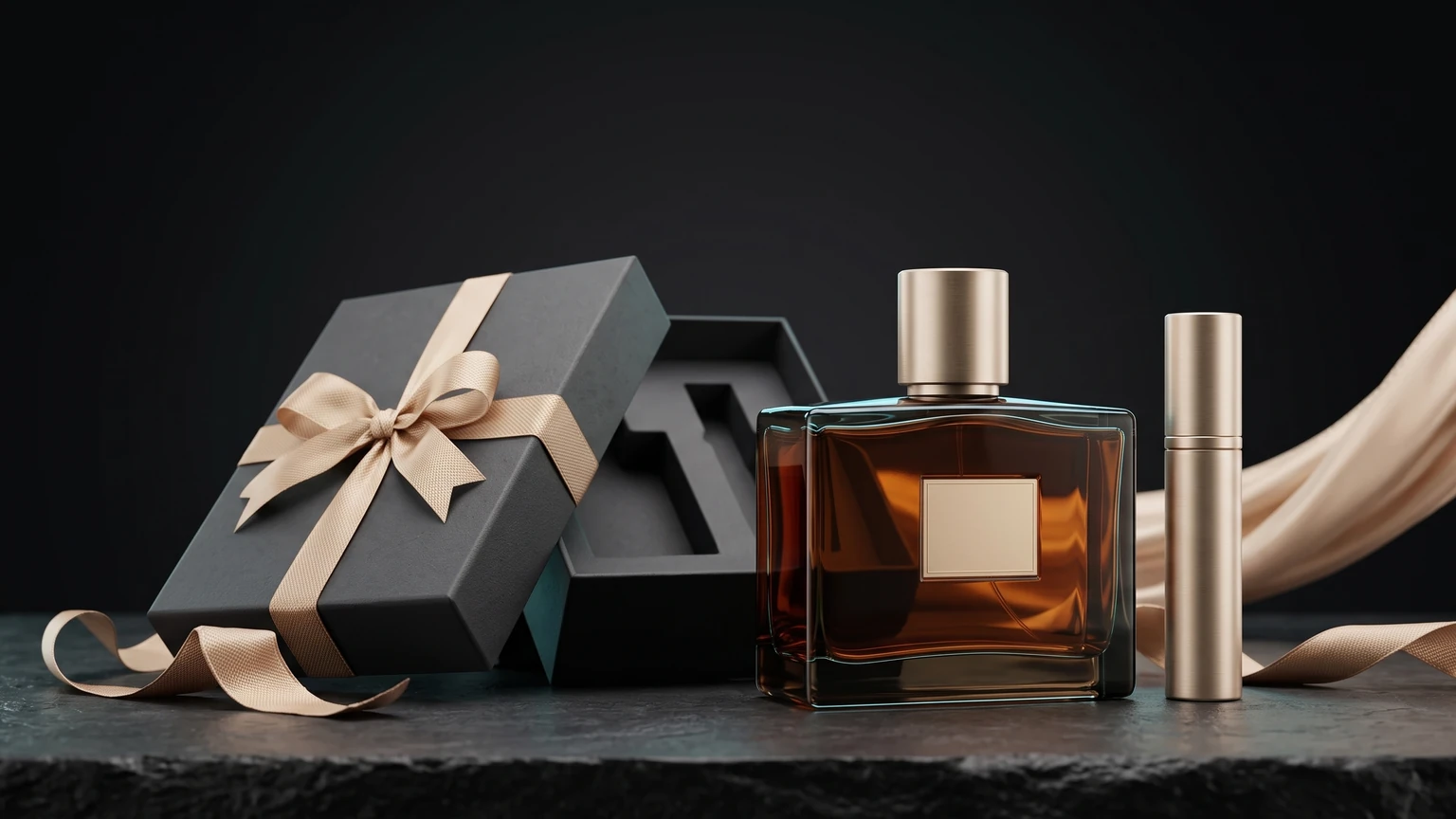 Closing offer card
The same bottle in a gift scene: ribboned box, sample vial beside it, dark background, soft rim lightThe closing offer card is built from the same product, so the clip and the card do not look shot in different universes. Space for the text is left empty and the offer is added in the edit.
End-to-end example: one product photo, two ad shots
Here is a full pass through the workflow described above. The source is an ordinary studio product photo; two different ad shots are built from it. In both cases the prompt describes only camera movement and explicitly forbids changing the object.
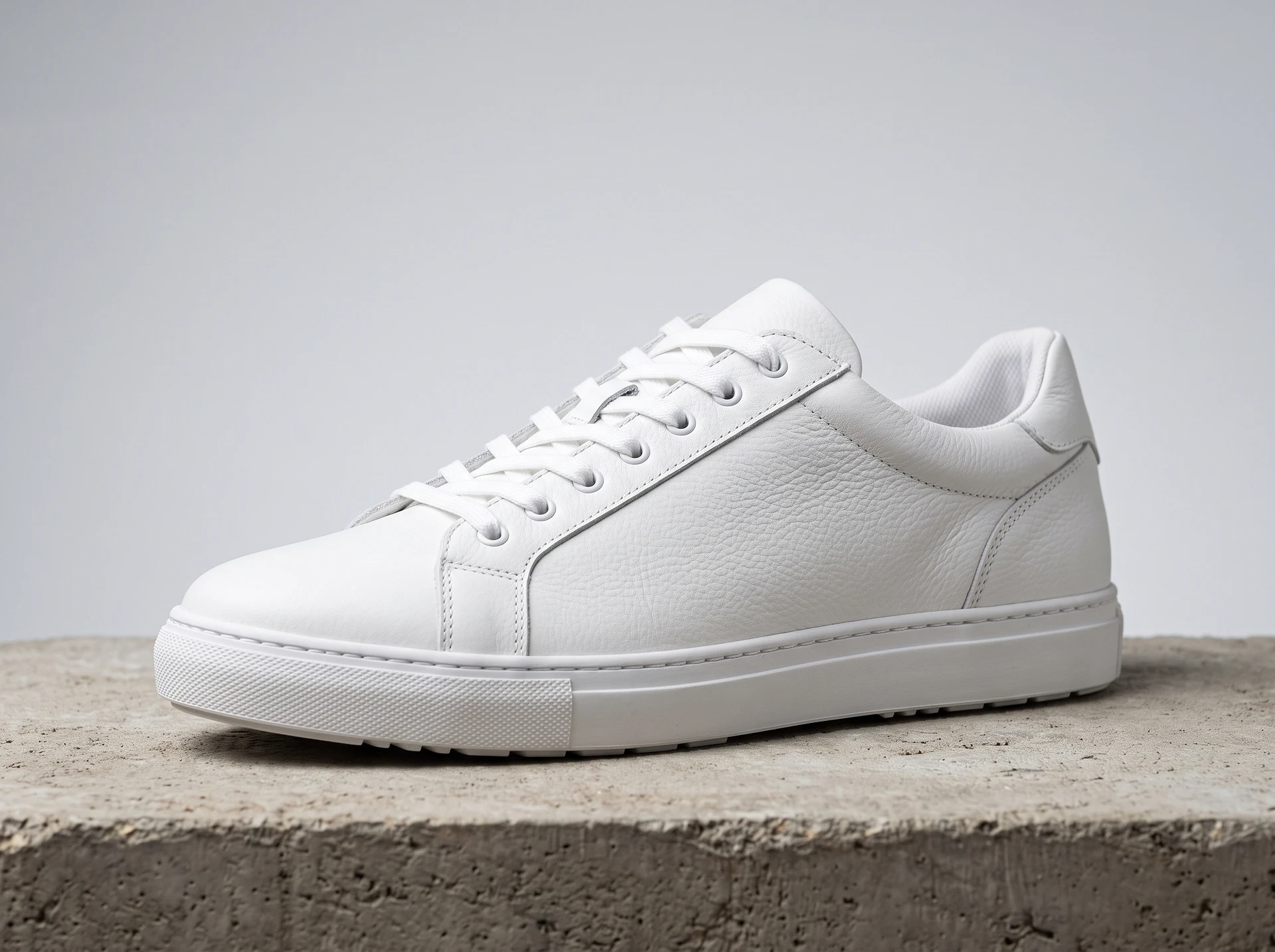
Shot 1. Slow orbit. Kling 2.6 Image-to-Video, 5 seconds, sound off — 20 credits, about $0.80. The prompt: camera travels left to right at a constant distance, product stays centred, lacing and grain unchanged.
Shot 2. Macro push-in. Same model, same price, same source file. The prompt: slow push toward the stitching and grain, object motionless, only camera position and depth of field change.
What matters here for advertising: both clips come from one file, so the product is literally the same in each — something you do not get from separate text-to-video generations. Phrases like “the object does not move or deform” and “proportions unchanged” are not decoration; they are what keeps the sole shape and lacing from being reinvented. Testing the idea costs 40 credits for two shots, about $1.60, plus 4 credits for the source image.
From here the two modules assemble into an ad: the orbit as the opening shot, the macro as proof of quality, then an offer card. There is no need to generate the whole ad in one pass — module by module is cheaper and far more predictable.
Step-by-step production workflow
Step 1. Choose one selling point
Write one sentence that the ad must communicate. Examples include “see the metallic finish,” “show how the lid opens,” “demonstrate compact scale,” or “introduce the seasonal color.” A shot should prove or dramatize that point. “Make it viral” does not describe a product benefit or a visual event.
Step 2. Build a short shot, not the whole advertisement
Generate a five- or six-second motion unit first. One unit might be the hook, a product detail, a use action, or an end-card transition. Short modular clips are easier to review and replace than a single long generation containing every campaign beat.
The broader photo-to-video AI page is the correct place to compare the general image-to-video workflow. For this product-ad use case, stay focused on the sellable item, the evidence in the shot, and the editable offer around it.
Step 3. Review product fidelity frame by frame
Do not approve the clip from a thumbnail or a single playback. Pause at the start, first motion, midpoint, largest camera-angle change, interaction frame, and end. Compare each point with the product reference.
| Review item | Pass condition | Typical failure | Direct fix |
|---|---|---|---|
| Silhouette and dimensions | Outer shape remains consistent | Container narrows, stretches, or grows | Reduce orbit and product motion |
| Logo and printed label | Position and recognizable structure remain stable | Letters mutate during camera movement | Use a smaller move; overlay approved artwork in post |
| Color and material | Finish changes only with plausible light | Black becomes blue or matte becomes metallic | Name the material and restrict the light sweep |
| Parts and accessories | Cap, strap, buttons, ports, and included pieces persist | A feature disappears or an extra piece appears | List protected details and shorten the action |
| Pack count | The number of sellable units never changes | One item duplicates in a reflection or transition | Remove reflective clutter and simplify the scene |
| Use action | Contact and product behavior are physically plausible | Hands pass through the object or change its scale | Use one hand and one contact point |
Step 4. Assemble the advertisement as editable layers
Place the final hook, price, discount, CTA, disclaimer, subtitles, and logo in the editing layer. This keeps spelling and figures exact. It also lets you produce multiple offers from one approved motion shot. Do not burn a temporary promotion into the generative footage if it will need a date, locale, or audience change.
A practical 15-second structure uses three modules:
- Hook: one visual change that reveals the item or its use.
- Proof: a close detail, feature, texture, or simple interaction that supports the benefit.
- Offer and action: the real product image or held frame with editable offer, qualification, and CTA.
Step 5. Create placement-specific versions
Do not treat cropping as the only difference between placements. A vertical version needs a composition that leaves room above or below the product for a hook and CTA. A square version often needs larger type and tighter timing. A horizontal version can use lateral movement and more environmental context.
Google Ads currently recommends 1080 by 1920 pixels for vertical 9:16 video, 1080 by 1080 for square 1:1, and 1920 by 1080 for horizontal 16:9. Those specifications are useful export targets, but the delivery platform’s preview remains the final check because interface overlays and placements can change.
Step 6. Review claims, rights, and landing-page consistency
The FTC’s business guidance says advertising must be truthful and non-deceptive, objective claims need supporting evidence, and advertisements cannot be unfair. AI motion does not change that standard. If the animation makes a product appear larger, faster, stronger, fuller, or more capable than it is, the visual may communicate a claim even without written copy.
Check that the item, color, pack count, price, availability, included parts, and stated benefit match the destination page. Google Merchant Center likewise advises maintaining accurate product data and matching that data to landing pages. Treat this as a final release gate, not an optional polish pass.
Generate the first product-motion unit in Clipia, then keep the offer and CTA editable until the campaign is approved.
Choose a model by shot requirement, not by one universal ranking
Product ads reward control. The best model for a low-cost motion test may differ from the best model for a higher-resolution hero shot. Use a short, restrained prompt on several options before you invest in multiple placement versions.
| Model and checked configuration | Verified price | Useful product-ad test | Review focus |
|---|---|---|---|
| Grok Imagine Video 1.5, 5 seconds, 480p | 5 credits ≈ $0.20 | Fast motion-direction comparison | Product detail at the chosen resolution |
| Hailuo 02 Standard, 6 seconds, 512p | 7 credits ≈ $0.28 | Low-cost camera and motion concept | Small label detail at lower resolution |
| Grok Imagine Video 1.5, 5 seconds, 720p | 9 credits ≈ $0.36 | The same prompt at a higher resolution | Stability across the whole move |
| Hailuo 02 Standard, 6 seconds, 768p | 16 credits ≈ $0.64 | Product material and silhouette review | Reflections and hidden surfaces |
| Kling 2.6 Image-to-Video, 5 seconds, generated sound off | 20 credits ≈ $0.80 | Controlled product or logo motion | Typography stability and transformation effects |
These values were read from Clipia’s live production pricing matrices on August 16, 2026. They apply only to the listed duration, resolution, and sound setting. They are not a permanent price promise, and the total shown in the studio before generation is the final source.
A product-motion prompt formula
A strong prompt assigns every moving element a job while explicitly protecting the sellable item. Use this order:
- Identity lock: state that the product must remain identical to the source.
- Camera: name one move and its size or speed.
- Product action: keep it still, rotate slightly, open once, or receive one touch.
- Environmental motion: choose one light, shadow, steam, water, particle, or fabric event.
- Protected details: list silhouette, label, logo, material, color, closures, and accessories.
- Exclusions: forbid added objects, new text, duplicated products, morphing, camera shake, or hands when they are not required.
The product remains identical to the source image. [One camera move]. [One product action]. [One environmental motion]. Preserve [protected details]. No [unwanted changes].
Prompt for a premium bottle
The bottle remains identical to the source image. Slow 15-degree camera orbit from left to right, the bottle stays fixed, one narrow highlight travels across the glass. Preserve bottle shape, cap, liquid color, label position, logo, and glass thickness. No new text, no extra bottle, no smoke crossing the label, no morphing.
Prompt for a sneaker
The sneaker remains identical to the source image. Slow macro push toward the side panel while soft shadows move across the background. Preserve sole pattern, lace count, stitching, logo placement, color, and proportions. No foot, no bending sole, no new accessories, no camera shake.
Prompt for packaged food
The package remains sealed and identical to the source. Stable camera with a subtle forward move, a soft kitchen reflection travels across the wrapper, restrained steam rises in the distant background. Preserve package dimensions, product name, flavor color, weight area, seams, and pack count. No opening package, no floating ingredients, no generated claims.
Common failures and direct fixes
The label changes during the move
Reduce camera angle, shorten the clip, and stop the product itself from rotating. If the master logo must remain perfectly crisp, cover the final visible label area with approved artwork in post or use a held source frame for the CTA card.
The product becomes a different model or SKU
List the differentiating features in the preservation clause: cap color, number of controls, strap pattern, sole shape, pack size, or included pieces. Remove style words that conflict with the source, such as asking a matte plastic item to become polished metal.
The hand looks convincing but the object changes scale
Use one contact point and one action. A finger pressing one visible control is more constrained than two hands opening, pouring, closing, and passing the product. If the interaction is not necessary to prove the benefit, use an orbit or environment-only shot.
The generated offer is misspelled
Remove all promotional typography from the video prompt. Generate the visual plate, then add the approved price, discount, CTA, and disclaimer as text layers. This is faster to localize and safer to revise.
One crop hides the product or the CTA
Return to the source and generate separate compositions for the important placements. Do not rely on an automatic center crop when the product sits near an edge or the camera move uses horizontal space.
The video looks attractive but does not sell anything specific
Reconnect the shot to one product fact. A texture reveal supports material quality; a use action supports ease of operation; a stable packshot supports recognition. Atmosphere without a product reason is decoration, not proof.
What to read next
- AI for advertising — ad scenarios, shot types and platform formats.
- Animation of photo — image-to-video basics if the product is not shot yet.
- Photo to video with sound — when the ad needs native audio.
- AI image prompt guide — the five-component formula for the source frame.
Frequently asked questions
How do I turn a product photo into a video ad with AI?
Upload a clear product photo, choose image-to-video, and generate one short camera or lighting move while instructing the model to preserve the product. Review every key frame, then add the verified offer, price, disclaimer, logo, captions, and CTA as editable layers. Export a separate composition for each placement rather than relying only on cropping.
Which product photos work best for AI video ads?
Use a sharp, high-resolution image with visible product edges, readable identifying details, controlled reflections, and enough composition space for the requested movement. A three-quarter view gives an orbit more depth information than a perfectly flat front view. Keep an approved full packshot available even if the ad starts from a close crop.
How do I keep a logo and package label unchanged?
Limit the camera angle, keep the product motion restrained, and list the logo, label position, shape, color, and closures in the preservation clause. Inspect the full clip frame by frame. For strict brand accuracy, use the original logo or label artwork on the held end card instead of relying on generated typography.
Should AI generate the price and CTA inside the video?
No, not when the price, spelling, qualification, date, or legal wording must be exact. Generate the visual product shot without promotional typography, then add the offer and CTA in an editor. Editable copy can be corrected, localized, or replaced without regenerating the product motion.
Which image-to-video model is best for a product ad?
There is no universal winner. Test the shortest practical configuration on the same source photo and prompt. Compare product identity, label stability, camera control, material rendering, and cost. Choose the lowest-cost output that passes the required resolution and fidelity review for the placement.
What aspect ratios should I make for video ads?
Prepare placement-specific masters. Common deliverables include vertical 9:16, square 1:1, and horizontal 16:9. Google Ads currently recommends 1080 by 1920, 1080 by 1080, and 1920 by 1080 respectively for HD assets. Always review the current platform preview and keep important copy clear of interface overlays.
Sources
- Clipia production pricing matrix: Hailuo 02 Standard — duration and resolution prices checked August 16, 2026.
- Clipia production pricing matrix: Kling 2.6 Image-to-Video — five-second base price checked August 16, 2026.
- Clipia production pricing matrix: Grok Imagine Video 1.5 — five-second 480p and 720p prices checked August 16, 2026.
- Federal Trade Commission: Advertising and Marketing guidance — official truth, evidence, deception, and fairness guidance.
- Google Merchant Center: product data specification — official primary-image accuracy and additional-image staging guidance.
- Google Ads: video ad specifications and format requirements — official horizontal, vertical, and square asset dimensions.
- Google Merchant Center: tips to optimize product data — official accuracy and landing-page consistency guidance.
If you need the general technique before building an advertisement, read the complete photo-to-video workflow. For a campaign-ready asset, keep the product shot constrained and the commercial copy editable.
Turn your product photo into a controlled video shot in Clipia, review fidelity, and add the approved offer only after the motion passes inspection.


