Seedance 2.5: How to Use It, What It Costs, and Whether 4K Is Real
Three real outputs, a 480p-versus-720p comparison, retry budgets and a timed prompt

Seedance 2.5 can return up to 30 seconds of video from one generation, but that does not automatically mean one uninterrupted camera take—and it does not prove native 4K. We tested the model in three practical ways: a full 30-second output at 720p, two separate 480p and 720p runs using the same prompt, and a comparison of downloaded file properties with the public documentation. The short verdict is that Seedance 2.5 works best when a scene develops over time, while its available output resolution currently tops out at 720p.
We integrated Seedance 2.5 into Clipia and used real generations for this review. The prices below therefore refer to Clipia, technical properties come from the saved files and the current public API, and quality observations apply to the embedded examples. All changeable details were rechecked on August 14, 2026.
What Seedance 2.5 can do: the short verdict
- Main advantage: up to 30 seconds from one request. The result may contain shot changes and model-generated edits, but the user does not have to stitch several exports together manually.
- Available resolutions: 480p and 720p. The public model documentation does not list 1080p or native 4K.
- 30-second price: 180 credits at 480p or 293 credits at 720p — roughly $7.20 and $11.75, i.e. $0.24 and $0.39 per second of finished video.
- Access: available in Clipia with a card payment; no separate provider account required.
- Best use cases: product ads, short stories, previsualization and social video where scene development matters more than a master above 720p.
- Main production risk: generation is probabilistic. A usable final take should not be budgeted as a guaranteed one-attempt result.
How Seedance 2.5 differs from Seedance 2.0
Seedance is ByteDance's line of video models. Version 2.5 shipped in August 2026 and removes the main constraint of the previous generation: scene length.
Seedance 2.0 capped out at 15 seconds, so a finished ad had to be assembled from several generations, and identity, lighting and product appearance drifted between the joins. Version 2.5 returns up to 30 seconds from a single request, which is the practical difference. What else changed:
- Duration: 4–30 seconds in one-second steps, up from 4–15.
- Reference images: up to 30, up from 9 — the model uses them to hold a character, product or scene style.
- Reference video and audio: up to 10 of each through the API. A video reference drives camera motion, not just appearance.
- Prompt length: up to 30,000 characters, enough for a full shot list.
- Audio: generated together with the picture rather than added in a separate pass.
How we tested the model
We framed the review around three practical questions:
- Does a single request actually return a finished file close to 30 seconds long?
- What changes between 480p and 720p when the prompt and duration stay the same?
- Is native 4K exposed in the interface or public API?
For the first test, we saved the original MP4 and inspected its metadata. For the second, we recovered two separate generations from the work history with the same prompt, 16:9 framing, a ten-second duration and audio enabled. For the third, we compared the model documentation with the actual dimensions of downloaded files.
How to reproduce our test in the editor
This is not a complete platform tutorial. It is the shortest sequence that reproduces the comparison conditions used in this review.
- Choose the input mode. Use “Text to Video” to start from a prompt. Switch to “Image to Video” and upload a reference when the first frame or subject already exists.
- Confirm that Seedance 2.5 is selected. The model name appears directly below the prompt field. Do not confuse it with Seedance 2.0, which has different duration limits and parameters.
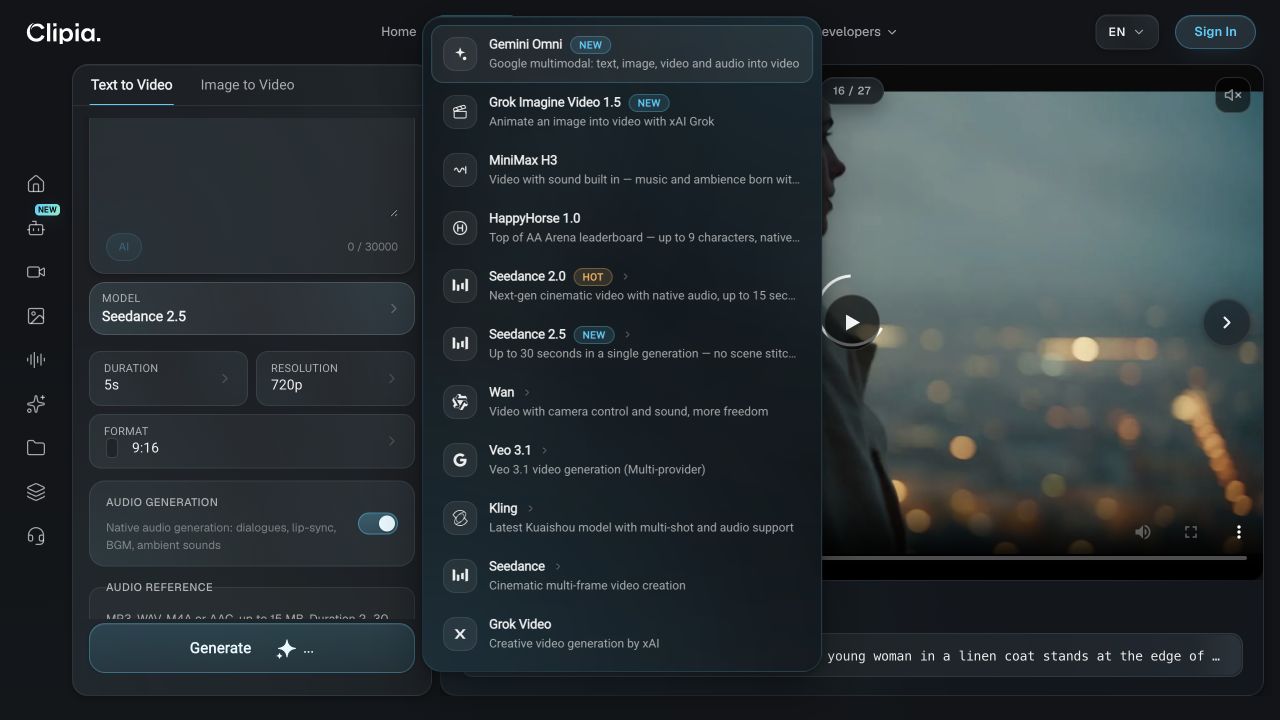
- Enter one testable prompt. Lock the subject, action, camera movement, light, sound and frame format. Do not change the wording between the 480p and 720p attempts.
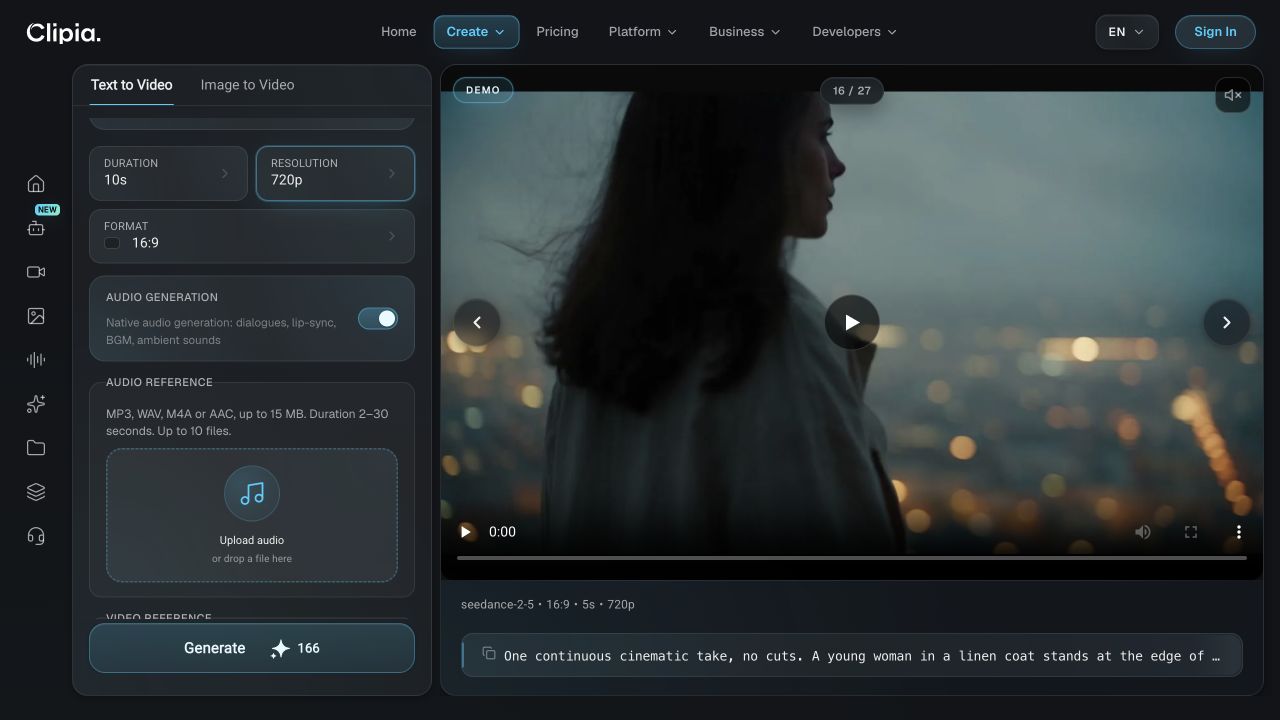
- Set duration and resolution. A four-to-ten-second 480p run is sufficient for a draft. To reproduce our comparison, use ten seconds, 16:9, enable audio and run separate attempts at 480p and 720p.
- Check the cost before starting. The Generate button shows the credit requirement for the current settings. When the result is ready, inspect its beginning, middle and end, then verify the downloaded file’s duration and dimensions.
Do not compare two outputs only by their first frame. Separate generations vary even with identical prompts, so evaluate identity stability, camera motion, speech synchronization and whether the closing frame is usable in an edit.
Test 1: does Seedance 2.5 really generate 30 seconds in one pass?
Full Seedance 2.5 result: 30.048 seconds, 1280×720, 32 kHz stereo audio. It came from one generation, but the output contains several shots and narrative transitions.
This example confirms the duration claim: the model returned a finished file close to 30 seconds. The phrase “one take,” however, needs care. The clip moves from a flooded city to a fantasy creature and then to a domestic scene with a person. It is not one physically continuous camera shot of the same subject. The useful capability is that the model assembled a longer sequence from one request without requiring the user to join multiple generated files.
Longer duration also makes failures more visible. As prompts add characters, objects and locations, maintaining exact identity becomes harder. A 30-second prompt works best as one story with a clear beginning, development and ending—not as five unrelated ideas forced into the same request.
Define success before generating
For a commercial job, choose three acceptance criteria in advance: the character or product remains recognizable, the key action occurs, and the final frame is usable in the edit. A visually impressive clip is not production-ready if the package changes shape or the promised action never happens.
Test 2: how does 720p differ from 480p on the same prompt?
The following videos are separate generations made with the same source prompt. They are not one clip encoded at two resolutions. Random initialization changes the people, composition and movement, so this is a realistic comparison of two user choices rather than a pixel-for-pixel laboratory test.
A fast-paced clip in which people from different countries and cultures wear traditional clothing, say “Clipia,” smile and celebrateA fast-paced clip in which people from different countries and cultures wear traditional clothing, say “Clipia,” smile and celebrateUse 480p for drafts. It is sufficient to validate the concept, shot size, camera motion and overall rhythm before paying for the highest exposed mode on every iteration.
Keep 720p for final attempts. The extra detail matters most on faces, small product features, fabric texture and any shot that will be cropped in post. Social platforms will compress the upload, but compression cannot recover detail that was absent from the source.
Test 3: does Seedance 2.5 support 4K?
As of August 14, 2026, Seedance 2.5 produces 480p or 720p files. Both the public documentation and the downloaded outputs support that conclusion: the files we inspected measure 854×480 and 1280×720. A 3840×2160 option is not listed among the model parameters.
A “4K” label on another service therefore does not by itself prove native generation at that resolution. It may mean that a 720p output was enlarged with a separate upscaler after generation. If resolution matters to the job, inspect the downloaded file and ask at which stage 4K was produced.
Upscaling can still be useful before editing or client delivery. It may resize the image more cleanly and improve perceived edge quality, but it cannot recover fine scene detail that was absent from the 720p source. Generation and upscaling should be treated as two separate production stages.
How much Seedance 2.5 costs: credits, dollars and price per second
Price depends on duration and resolution. Text-to-video and image-to-video used the same matrix when we checked.
| Duration | 480p | 720p |
|---|---|---|
| 4 seconds | 43 credits · ≈$0.43/sec | 70 credits · ≈$0.70/sec |
| 5 seconds | 53 credits · ≈$0.43/sec | 88 credits · ≈$0.71/sec |
| 10 seconds | 104 credits · ≈$0.42/sec | 166 credits · ≈$0.67/sec |
| 15 seconds | 138 credits · ≈$0.37/sec | 196 credits · ≈$0.52/sec |
| 20 seconds | 152 credits · ≈$0.30/sec | 226 credits · ≈$0.45/sec |
| 30 seconds | 180 credits · ≈$0.24/sec | 293 credits · ≈$0.39/sec |
The dollar figures are converted from the monthly Standard and Pro plans, so a 30-second clip costs roughly $7.20 at 480p and $11.75 at 720p. Note how the per-second rate drops with length: at 480p it falls from $0.43 per second at four seconds to $0.24 at thirty. A long scene generated in one pass is cheaper than a series of short clips of the same total length.
The editor shows the final amount before the request starts. That number is the source of truth because pricing can change after an article is published.
Why a one-attempt price is not a production budget
Identical settings can produce different faces, expressions, motion and composition. A realistic selection budget allows several variants:
- three ten-second generations at 720p: 498 credits;
- three 30-second generations at 480p: 540 credits;
- three 30-second generations at 720p: 879 credits, about $35.25.
This is not a prediction that every job needs three runs. It is a safer budget for choosing the strongest take. Test composition with a short 480p run, then move the stable prompt to 30 seconds and 720p.
A timed prompt for a 30-second scene
A short sentence can describe a five-second moment. Over 30 seconds, the same sentence often becomes a stretched and static scene. A longer prompt should specify changes over time, camera movement, sound and the details that must remain consistent.
6–14 seconds. The barista places a cup on the counter. Steam rises. We hear the espresso machine and quiet conversation. The camera moves from a wide shot to a medium shot.
14–23 seconds. Smooth push-in to a macro view of the coffee surface, then the camera rises toward the guest’s face. The character’s appearance, clothing and lighting remain unchanged.
23–30 seconds. The guest takes the first sip and smiles. The camera comes to a gentle stop. No lettering or logos in the frame.
The structure gives the model five anchors: timestamps, sequential events, explicit camera direction, continuity constraints and a specific soundscape. If a person or product must remain recognizable, add several consistent references. Matching clothing, lighting and neutral backgrounds usually help more than a long verbal description of appearance.
Common failure modes and practical fixes
The character or product changes during the clip
Reduce the number of new objects, list the properties that must stay fixed and provide references from several angles. Avoid changing the location, lighting, clothing and shot size at the same moment.
The camera invents unwanted movement
Replace words such as “dynamic” or “cinematic” with one specific instruction: locked camera, slow push-in, left-to-right pan or an arc around the subject. If the camera must stop, name the point where it stops.
The 30-second result feels padded
Add two or three related events and assign timestamps. If the idea still does not develop, shorten the clip. Maximum duration is not a goal for every prompt.
Text inside the video is distorted
Do not use the video model for final typography. Reserve clean negative space for the offer, logo or subtitles and add them in an editing tool.
Seedance 2.5 through the API and MCP
The model is not limited to the interface. In the public Clipia API it has two slugs — seedance-2-5-t2v for text-to-video and seedance-2-5-i2v for image-to-video. Through the MCP server it can be called straight from Claude Code, Cursor or any other agent: the generate_video tool accepts the same parameters, including duration, resolution and references.
Full request parameters and the pricing matrix are in the API documentation.
When Seedance 2.5 is the right choice
The model is particularly useful for a product ad with a camera pass, a short story centered on one main character, previsualization and rapid testing of a creative concept. Its advantage becomes meaningful when a scene develops for more than ten seconds and should be assembled from one request.
For a four-second loop, a light photo animation, strict documentary identity across several people or a native master above 720p, the advantage is smaller. A simpler model—or a workflow that explicitly includes editing and upscaling—may be more efficient.
Current model settings and the generation controls are collected on the Seedance 2.5 model page. This review focuses on what the generated output looks like, which limitations appear in a longer clip and what budget to allow for several attempts.
Frequently asked questions
Does Seedance 2.5 create one continuous 30-second take?
It can create up to 30 seconds in one generation, but the output may contain shot changes and model-generated edits. “One request and one delivered file” is more accurate than promising one uninterrupted physical camera take.
Can Seedance 2.5 generate video from a photo?
Yes. The model supports both text-to-video and image-to-video. An image reference helps preserve a character, product, palette and source composition.
How many references can the model accept?
The public API separates the limits by media type: up to 30 images, ten videos and ten audio files. It should not be described as support for 50 images.
Does Seedance 2.5 have genuine 4K output?
The public model documentation lists 480p and 720p, matching the files we inspected. If another service offers 4K, verify whether that means the original model output or a separately upscaled file.
How much does a 30-second video cost?
As of August 14, 2026, it costs 180 credits at 480p or 293 credits at 720p — roughly $7.20 and $11.75, which works out to $0.24 and $0.39 per second. Check the editor before starting because the matrix may change.
Does Seedance 2.5 generate audio?
Yes. The 720p file in this review contains stereo audio at 32 kHz. That is a measurement of this output rather than a promise that every export will use identical audio properties.
Are credits returned when the style or camera angle is disappointing?
A subjective mismatch in style, framing or expression is not by itself a technical delivery failure. If the file was not delivered or you suspect a duplicate charge, provide support with the work identifier so the event can be checked.
More on AI video
- AI video prompts: reusable structures and examples
- How to create a video from a photo while preserving the source
- Seedance vs Kling vs Veo on matched scenarios
How we verified the facts
- We inspected the saved MP4 files. The full example is 30.048 seconds long, 1280×720 and includes 32 kHz stereo audio.
- We recovered the 480p and 720p pair from the work history: same prompt, ten seconds, 16:9 and audio enabled. They are separate generations, not two encodes of one file.
- Resolution and reference limits were checked against the public Seedance 2.5 documentation.
Final verdict
Seedance 2.5 is best understood as a model for longer video in which the scene develops over time—not as a path to a native 4K file. It does return a clip close to 30 seconds from one request, creates audio and gives users a practical choice between 480p and 720p.
The efficient workflow is straightforward: run a short 480p draft, fix the prompt, and reserve 720p for the final attempts. Most importantly, budget for several variants rather than treating one generation as a guaranteed finished clip.