Skip to content
Clipia.
Home
What are we creating?

Pick a mode — Studio opens with the right prompt ready

All templates
Text
AI AgentChat, ideas and scriptsPrompt EngineerCraft the perfect promptConcept DesignerVibe, palette, moodboard and refsTutorStep-by-step, explains the why
Images
Text → imageGenerate an image from a promptEditModify an existing photoImage templatesReady-made product shots and artAI Image GeneratorImages from text or photos
Video
Text → videoDescribe a scene and get a clipImage → videoBring a frame to life with motionVideo templatesReady-made scenes and stylesAI Video GeneratorText and image to finished videoPhoto → Video AIAnimate a frame with AIStudioVideo and images in one flow
Audio
Text → speechVoice over from textText → musicA track from a prompt
Pricing
AboutTeam, mission and contactsWhat's NewLatest features and updatesBlogGuides, cases and newsModelsAI model catalogSupportTech help and contacts
For BusinessAPI, MCP and transparent billingSolutions by industryAI for interiors, ads, restaurants and more nichesFor PartnersReferral program
MCP & CLINewGenerate in Claude, Cursor & CLIAI GatewayOpenAI-compatible LLM APIDocumentationAPI reference and guidesDeveloper APIREST API and SDK
Sign In
  • Home

  • Agent

    NEW
  • Create Video

  • Create Image

  • Audio

  • Studio

  • My Works

  • Models

  • Support

  1. Home/
  2. Video Models/
  3. Kling O3

Kling O3 demo

Watch the clip and explore its motion, detail, and camera work.

Watch demo

Related Models

Kling 3 AI demo
Kling 3Video
Wan 3.0 Video AI demo
Wan 3.0 VideoVideo
Seedance 2.5 AI demo
Seedance 2.5Video
Kling O3 — русская версия

Ready to create the impossible?

Welcome credits are already on your account — start creating.

Clipia.

Think differently — create the impossible.

All systems operational

Creation

  • Create Image
  • Create Video
  • AI Video Generator
  • AI Image Generator
  • Photo to Video AI
  • Templates

Solutions

  • For interiors
  • For advertising
  • For ad videos
  • For restaurants
  • For online schools
  • For game dev
  • For events
  • For presentations
  • All solutions

Models & resources

  • AI Models
  • Claude Opus 5
  • Gemini 3.6 Flash
  • Video Models
  • Image Models
  • Model Rankings
  • What's newNEW

Help

  • Guides
  • Documentation
  • About
  • Contact Us
  • Email Support

Legal

  • Terms of Service
  • Privacy Policy
  • Payment & Refund
  • Refund Policy
  • Content License
  • Cross-Border Transfers
  • Data Processing Consent
  • Partner Agreement
© 2026 Clipia.ai. All rights reserved.
CookiesAcceptable Use

Clipia is an independent platform. Third-party AI model names are used solely to identify integrations available through our interface and do not imply affiliation with or endorsement by their respective owners.

Kling 3.0 Omni · launch preparation

Kling O3 references and video transformation

From a text scene to reworking existing footage: four staged modes use images, references and source video. The model remains disabled in Clipia.

Explore Kling O3 modesSee examples

Kling O3 generation is not yet available in Clipia. This page shows its modes and examples.

modes
4
generation
up to 15 s
Clipia status
in review
In brief

What is Kling O3?

Kling O3 is the 3.0 Omni branch for multiple input types. It generates from text and images, uses visual references and can transform source footage. It is distinct from standard Kling 3.0. All four Clipia routes are staged but not yet enabled.

4
Clipia routes
up to 15 s
new clip
720p/1080p
staged levels
video → video
transformation
Multi-shot and transformation

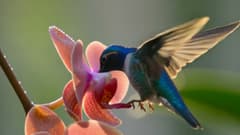
One hummingbird, two versions of a scene

The first clip moves from a wide to a macro shot in a conservatory. The second keeps the glass hummingbird's form from a reference image while it moves. The third changes daylight to a bioluminescent night while preserving source motion and cuts.

Text → video · two shots

A hummingbird in a sunlit conservatory

In five seconds, the camera glides through the conservatory, then cuts to a macro view of a blue hummingbird at a coral orchid. The subject stays recognizable across both shots; the clip is silent.

How to direct the scene
Direct two shots separately: first a wide camera move through the conservatory, then a macro shot of the hummingbird at the same orchid. Repeat the bird and flower colors for continuity.

Source image of a teal and amber glass hummingbird above a stone plinth
Source frame
Image reference → video

A glass hummingbird comes alive

In a single five-second shot, the bird in the reference image flutters its transparent wings and hovers above a stone plinth. Its teal and amber palette, glass material and silhouette remain recognizable. The clip is silent.

How to direct the scene
Use the supplied image as the exact reference for the glass bird. Keep the same plinth and dark studio, transparent wings and amber details; add wing motion and a slow camera orbit.
Frame from the original daylight video with a hummingbird and orchid in a conservatory
Source video
Video → transformation

The same conservatory after dark

The daylight source clip becomes a nocturnal scene with glowing leaves and a transformed orchid, while the hummingbird's flight path and shot transition remain intact. The clip is silent.

How to direct the scene
Turn the daylight conservatory into a bioluminescent night while keeping the source hummingbird flight, camera move, rhythm and shot transition unchanged.

Kling O3 generation is not yet available in Clipia. This page shows its modes and examples.

Explore Kling O3 modes
Specifications

Kling O3 specifications

Parameters follow the model contract; generation is not yet available in Clipia.

ParameterValueNote
DurationUp to 15 secondsFor new generation; transformation follows a separate contract
Resolution720p and 1080pThese levels are staged in Clipia
ModesT2V, I2V, R2V, TransformationFour separate catalog entries
AudioOptional native generationVideo transformation has separate input restrictions
Aspect ratioMode dependentTransformation sets source ratio automatically
InputsText, images, source videoThe required material depends on mode
Modes

Four Kling O3 modes

Create a new scene or alter an existing video.

Text to video

Create a short scene from a prompt with no source file.

Image to video

Animate a starting frame and direct what happens next.

Reference to video

Guide a scene with character and object images.

Video transformation

Supply source footage and describe the desired change.

Comparison

Kling O3 and Kling 3.0

O3 adds a separate way to work with source material.

ParameterKling O3Kling 3.0
Source videoDedicated transformation modeNo separate transformation mode
ReferencesDedicated reference generationVisual elements in a new scene
SoundDepends on input and modeNative audio in generation
Workflow

How to prepare a request

The source material determines mode and settings.

01

Choose the source

Text, a frame, references or source video.

02

Describe the change

Specify subject, action, shot, light and sound.

03

Check restrictions

Parameters for source-video transformation differ from new generation.

Pricing

Pricing in Clipia

Customer pricing will be published after route and credit billing checks.

This model is not yet open for generation in Clipia. Exact credit pricing will appear before launch.

Once the model opens, the price of your selected settings will be visible before you confirm generation.

Prompting

How to prompt Kling O3

Clear actions, framing and sound make a clip easier to direct.

01

Give references clear roles

Say which image defines the character and which sets the location.

02

Describe actions in steps

For multiple shots, specify their order and timing.

03

For transformation, name the change

Tell the model what to keep from the footage and what to alter.

Use cases

Where Kling O3 fits

Practical work this model can support.

A recurring character

References can help keep a subject visually consistent.

An alternative cut

Transformation can rework a source video.

A short storyboard

Several planned shots fit in a clip up to 15 seconds.

API

Integration through the Clipia API

The model route is staged, but public access depends on generation and billing checks.

Requests to this model are not enabled in Clipia while it is under review. The documentation covers currently available platform tools.

Clipia documentation
FAQ

Kling O3 questions

About model capabilities and its current Clipia status.

Not yet. Four modes are staged but remain disabled until results and billing are verified.

O3 is the multimodal 3.0 Omni branch with separate reference and source-video transformation modes.

The official guide states up to 15 seconds for new generation. Source-video transformation has separate parameters.

Clipia pricing is not yet published; source-video billing in particular still needs confirmation.

Yes. Three silent clips are shown: a two-shot text-to-video scene, a glass hummingbird animated from an image reference, and a transformation of source footage into a night scene.

No. Public access follows checks for each mode and its cost.

Model status

Kling O3 is being prepared for launch

Generation and video transformation will open after routing and credit charges are verified. Available models are listed in the catalog.

Video model catalog