Seedream 5.0 Pro Review (2026): 4 Tests, Pricing, vs Lite and Nano Banana
ByteDance's flagship image model on Clipia: what it does well, where it stops, what it costs and how it compares with Seedream 5.0 Lite and Nano Banana.

Seedream 5.0 Pro is ByteDance's flagship image model for controlled generation and precise reference-based editing. In our four tests on Clipia it produced a natural photoreal portrait, swapped a product's background without touching the product itself, rendered a Cyrillic headline with every letter in place and built a readable five-block infographic from a single prompt. On Clipia it costs 4 credits per image in Basic (1K) and 8 credits in High (2K). The trade-offs: one image per request, 2K maximum resolution and no 21:9 format. Pick it when accuracy matters more than volume; for 4K output or bulk drafts, Nano Banana or Seedream 5.0 Lite fit better.
Below: the spec sheet, the four tests with the exact prompt for each image, real pricing per plan, a comparison table against Seedream 5.0 Lite, Seedream 4.5, Nano Banana 2, Nano Banana Pro and GPT Image 2, and answers to the questions people search for most. You can repeat every test in the Clipia image generator — the model is preselected.
Seedream 5.0 Pro at a Glance
| Parameter | Seedream 5.0 Pro on Clipia |
|---|---|
| Developer | ByteDance (Seedream 5.0 line: Lite and Pro) |
| Type | Text-to-image and reference-based image editing |
| Output | One image per request, delivered as PNG |
| Quality modes | Basic (1K) and High (2K) |
| Price | 4 credits (Basic, 1K) · 8 credits (High, 2K) |
| Reference images | Up to 10, up to 10 MB each (JPEG, PNG, WEBP) |
| Aspect ratios | 1:1, 4:3, 3:4, 16:9, 9:16, 2:3, 3:2 |
| Not supported | 21:9, batches of several images per request |
| Best for | Precise edits, text inside the image, infographics, realistic portraits |
What Is Seedream 5.0 Pro?
Seedream is ByteDance's family of image models. Generation 5.0 ships in two variants: Seedream 5.0 Lite for fast, high-volume work and Seedream 5.0 Pro as the flagship built around control. Compared with its siblings, Pro differs in four ways:
- Precision instead of batches. Seedream 4.0 and Seedream 4.5 could return a series of images per request. Pro returns a single frame and puts the effort into making that one image controllable.
- Stronger instruction following in edits. When you work with references, Pro changes what you asked for and leaves the rest of the scene alone. This is the main reason to choose it over Lite.
- A different resolution grid. Pro offers Basic (1K) and High (2K). Lite uses 2K and 3K, so compare the two by editing accuracy and prompt adherence, not by pixel count alone.
- Fewer references, used more precisely. Pro accepts up to 10 reference images; Lite accepts up to 14 but follows them less strictly.
Strengths and Limitations
Where Seedream 5.0 Pro is strong:
- Targeted edits: background swaps, moving an object into a new scene, keeping a character consistent across images.
- Text inside the image, including Cyrillic: headlines, poster copy, labels on packaging.
- Dense layouts: diagrams with blocks, icons and captions from one prompt.
- Realistic skin, light and texture on close-up portraits in High mode.
Where it stops:
- 2K is the ceiling. If you need 4K files, use Nano Banana 2, Nano Banana Pro or GPT Image 2.
- One image per request, so exploring many variations costs more runs than with batch-oriented models.
- No 21:9. For ultra-wide banners, use Seedream 5.0 Lite.
- Very small text in dense infographics can contain occasional typos — proofread before publishing.
How We Tested Seedream 5.0 Pro
We ran the model in the Clipia interface through the four scenarios it is positioned for: a portrait, a reference-based edit, text inside the image and an infographic. Each test below shows the image we got, the prompt that describes it and what we checked. Prices in the captions are current Clipia rates.
Test 1: Realistic Portrait in High (2K)
The classic check for any image model: a close-up face under directional light. We looked at skin texture, eye sharpness and reflections, hair along the silhouette and how background details hold up in shallow depth of field. For close-ups, choose High (2K) from the start — this is where the difference from Basic is most visible.
Close-up portrait of an elderly fisherman sitting in a weathered wooden hut by the sea, deep wrinkles and sun-worn skin, short grey hair, charcoal knit sweater, calm half-smile, fishing nets, rope and green glass floats in the background, soft daylight from the window on the left, shallow depth of field, sharp focus on the eyes, photorealistic
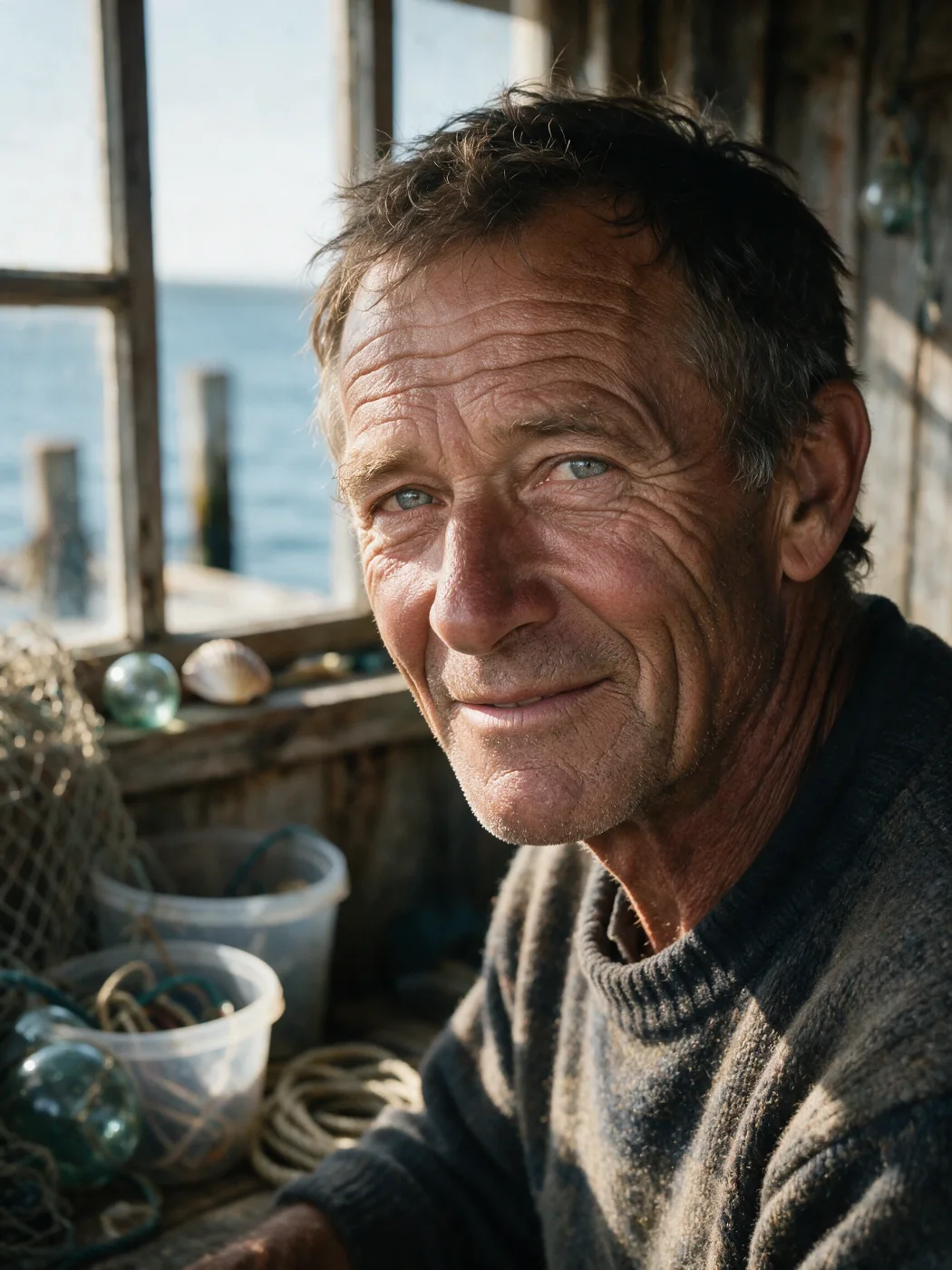
Result: wrinkles, stubble and skin tone read as photographic, the eyes are the sharpest point of the frame, and the window light falls consistently from one side. Background props (nets, floats, rope) stay recognizable while softly out of focus. For portrait work this is the strongest argument for paying 8 credits instead of 4.
Test 2: Reference-Based Editing (Background Swap)
This is Pro's headline feature. We took a studio shot of a black insulated bottle on a concrete block and asked the model to move it into a new environment. Three checks: does the object keep its shape and texture, does the small metal badge stay intact, and does the new light look natural on the product.
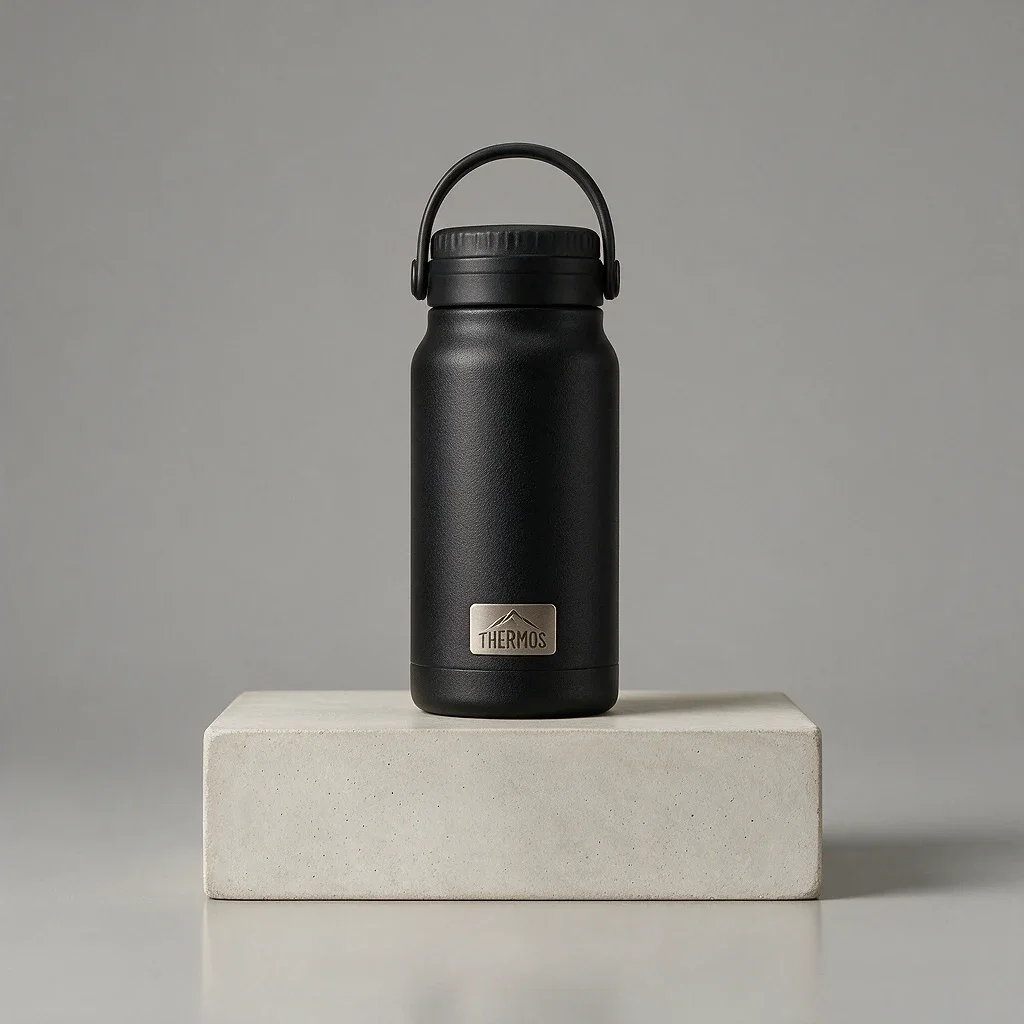
We attached the image above as a reference and sent this edit instruction:
Keep the black insulated bottle from the reference exactly as it is: same shape, handle, lid, matte texture and metal badge. Keep the concrete block under it. Replace the grey studio background with an autumn forest at golden hour: fallen orange leaves on the ground, warm backlight through the trees, light haze. Product photography, sharp focus on the bottle
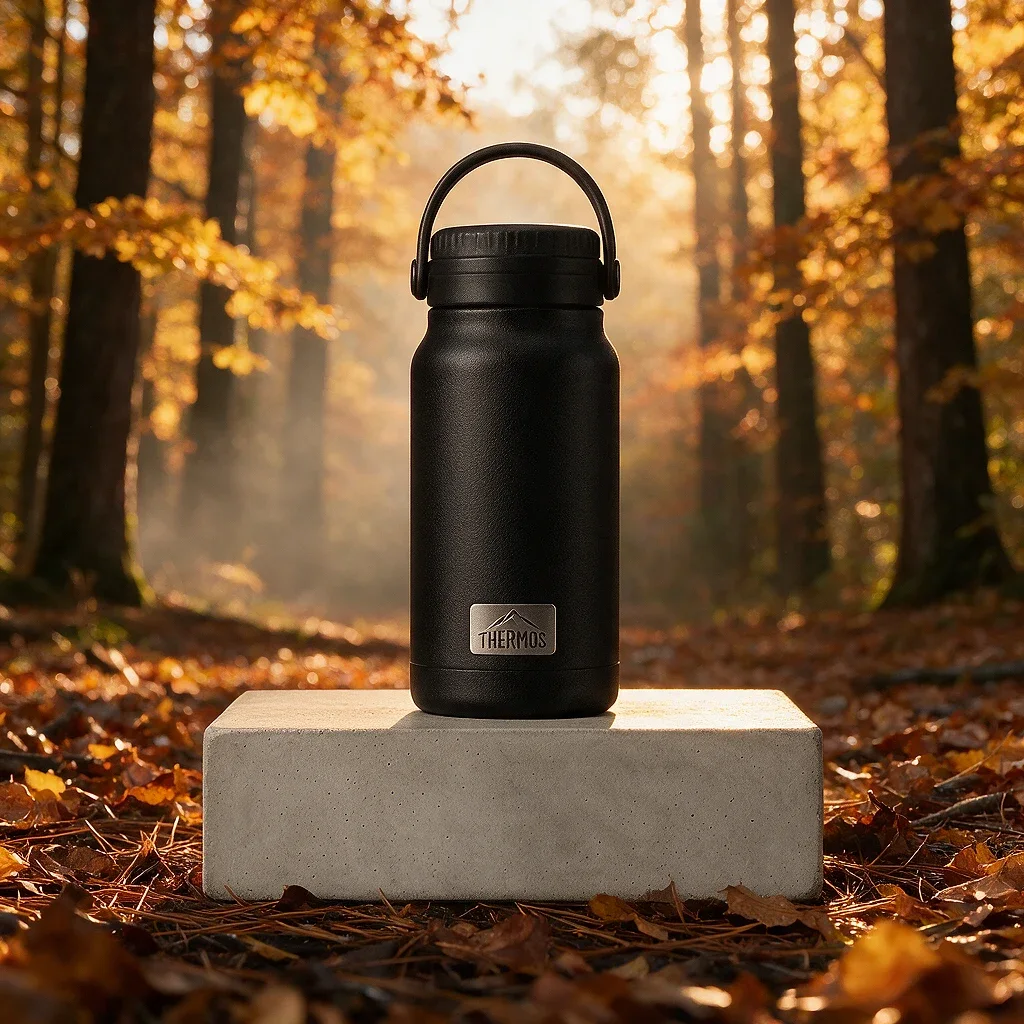
Result: the bottle, its handle and the badge survived unchanged, the concrete block stayed in place, and the warm backlight now wraps the product edges instead of looking pasted on. The practical rule: name explicitly what must stay the same, then describe the change. The edit touched only what we asked for.
Test 3: Text in the Image (Cyrillic Stress Test)
Text inside images has long been a weak spot of generative models, and Cyrillic is harder than Latin script. We deliberately asked for a Russian headline — «Утро начинается здесь» means “Morning starts here” — and checked the letters that models usually break. For an English poster, replace the phrase in quotes; the structure of the prompt stays the same.
Minimalist coffee shop poster on a warm cream background, large elegant serif headline «Утро начинается здесь» in soft gold letters at the top, a white porcelain cup of black coffee with a thin gold rim on a saucer below, a few wisps of steam, lots of empty space, clean print design

Result: the headline is spelled correctly, with even letter spacing and a consistent serif style, and the composition leaves the empty space we asked for. Short phrases in quotes work more reliably than long sentences; if you need a subheading, give it its own quoted line and expect to check it.
Test 4: Infographic From a Single Prompt
A task Pro is explicitly positioned for: a diagram of several blocks with icons and labels from one prompt. We judged hierarchy (does the structure read without explanation), alignment and the spelling of labels. It is the toughest density test — the more objects and text in the frame, the sooner a model's limits show. Our test used Russian labels; swap them for English ones in your own prompt.
Clean horizontal infographic on a light background: five rounded cards with thin blue outlines connected by arrows, titled «Идея», «Промпт», «Генерация», «Правки», «Результат». Each card has a line icon at the top and three short bullet labels below. Caption at the bottom: «Путь от идеи до готового изображения с помощью AI». Flat vector style, consistent icons, even spacing
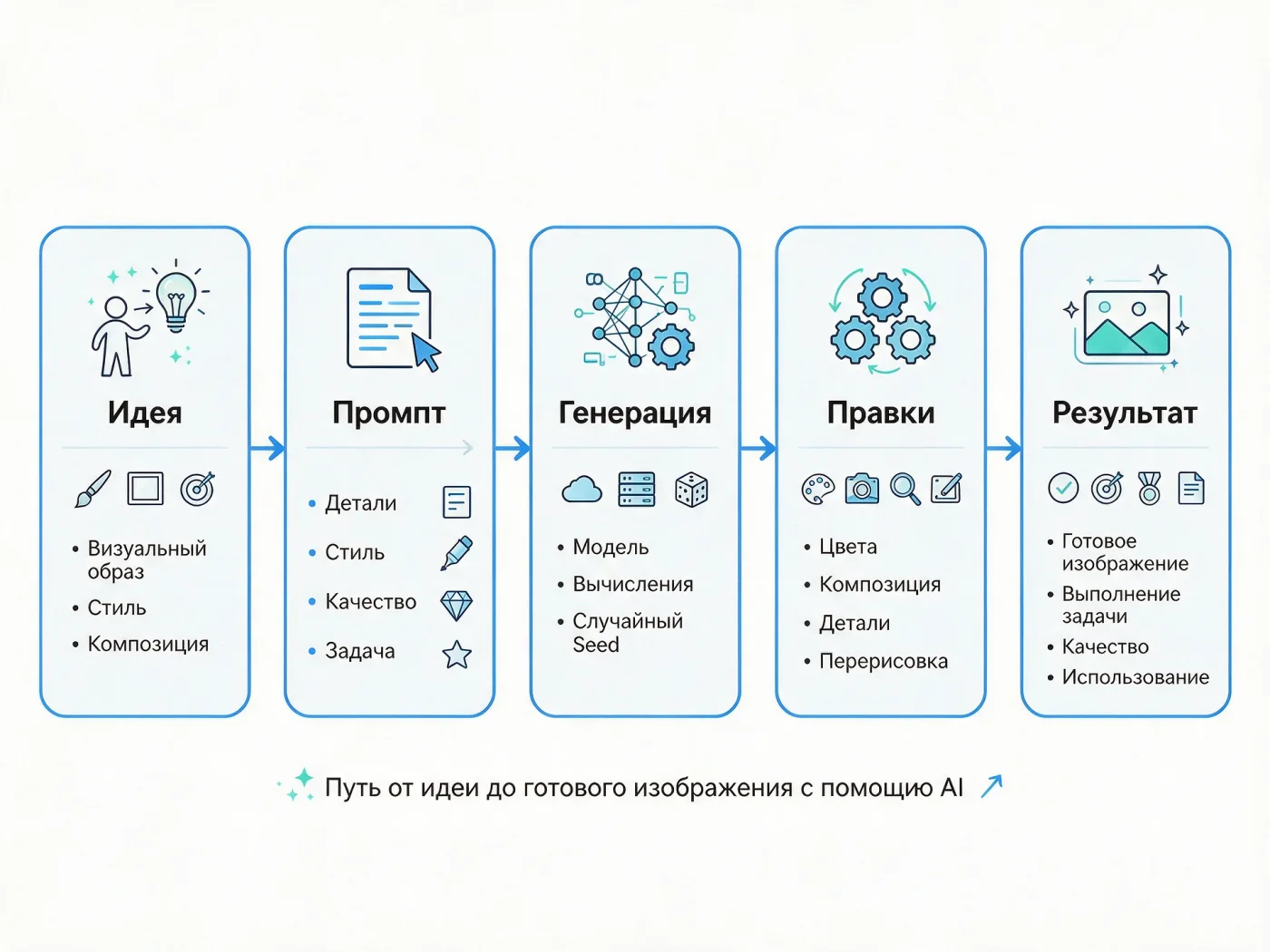
Result: the five-step flow reads left to right at a glance, icons share one visual style and the cards are evenly spaced. Titles are clean; the smallest bullet text is where occasional errors can appear, so treat the output as a strong draft and proofread it.
Seedream 5.0 Pro Pricing
The price depends only on the quality mode and is shown in the interface before you generate:
| Mode | Resolution | Credits per image |
|---|---|---|
| Basic | 1K | 4 |
| High | 2K | 8 |
How far each monthly Clipia plan goes with Seedream 5.0 Pro alone:
| Plan | Price per month | Credits | Basic (1K) images | High (2K) images |
|---|---|---|---|---|
| Basic | $10 | 240 | 60 | 30 |
| Standard | $19 | 480 | 120 | 60 |
| Pro | $39 | 960 | 240 | 120 |
| Ultima | $115 | 2,900 | 725 | 362 |
Annual billing is 20% cheaper. A practical workflow: search for composition in Basic at 4 credits, then render the final version in High at 8 credits. Credits are shared across all models on Clipia, so the same balance also covers video and other image models.
Seedream 5.0 Pro vs Lite vs 4.5 vs Nano Banana vs GPT Image 2
All six models run on Clipia from one account. Prices are current credit rates; resolution and reference limits are the options available in the Clipia generator.
| Model | Credits per image | Max resolution | References | Choose it for |
|---|---|---|---|---|
| Seedream 5.0 Pro | 4 (1K) · 8 (2K) | 2K | up to 10 | Precise reference edits, text in the frame, infographics |
| Seedream 5.0 Lite | 3 (2K) · 4 (3K) | 3K | up to 14 | Fast high-volume work, 21:9 banners |
| Seedream 4.5 | 3 (2K or 3K) | 3K | up to 14 | Budget work with many references |
| Nano Banana 2 | 4 (1K–2K) · 6 (4K) | 4K | up to 10 | 4K output, extreme formats such as 1:8 and 8:1 |
| Nano Banana Pro | 5 (1K–2K) · 7 (4K) | 4K | up to 10 | 4K output with a choice of PNG or JPEG |
| GPT Image 2 | 3 (1K) · 5 (2K) · 7 (4K) | 4K | up to 16 | The most references and very long prompts |
Seedream 5.0 Pro vs Seedream 5.0 Lite. Lite is cheaper at higher resolution (4 credits for 3K) and supports 21:9, but Pro follows edit instructions more strictly. Use Lite for volume and wide formats, Pro when an edit must not spill over onto the rest of the image.
Seedream 5.0 Pro vs Nano Banana (Google's Gemini image models). At 1K–2K the prices are close: 4–8 credits for Seedream 5.0 Pro, 4 for Nano Banana 2 and 5 for Nano Banana Pro. The deciding factor is resolution: if the deliverable must be 4K, go with Nano Banana. If it must be a precise edit or a layout with text, start with Seedream 5.0 Pro and compare on your own brief — switching models in Clipia takes one click.
Seedream 5.0 Pro vs GPT Image 2. GPT Image 2 accepts up to 16 references and very long prompts and goes up to 4K. Seedream 5.0 Pro is the more focused tool for single-image edits and infographics at 2K.
How to Use Seedream 5.0 Pro on Clipia
- Open the image generator with Seedream 5.0 Pro — the model is already selected.
- For an edit, attach up to 10 reference images (JPEG, PNG or WEBP, up to 10 MB each).
- Write the prompt: first what must stay unchanged, then what to change, then light and style.
- Pick an aspect ratio (1:1, 4:3, 3:4, 16:9, 9:16, 2:3 or 3:2) and a mode: Basic (1K, 4 credits) for drafts, High (2K, 8 credits) for finals.
- Check the credit cost on the Generate button and run. Model details and examples are on the Seedream 5.0 Pro page.
Prompt Tips: Bad vs Good
Edits — say what to keep.
Bad: put the bottle in a forest
Good: keep the bottle, handle and badge exactly as in the reference; replace only the background with an autumn forest at golden hour
Text — keep it short and quoted.
Bad: a poster that says good morning and fresh coffee every day with our new roast
Good: large serif headline “Good morning” at the top, nothing else written
Infographics — list every label.
Bad: an infographic about the design process
Good: five cards connected by arrows titled “Idea”, “Prompt”, “Generation”, “Edits”, “Result”, one line icon per card
More techniques in our AI image prompt guide.
More on AI Image Generation
- How to choose an image generation model — which model fits which task.
- AI image prompts that work — structure and ready-made examples.
- How to write prompts — the full guide for images and video.
Frequently Asked Questions
How much does Seedream 5.0 Pro cost?
On Clipia, Seedream 5.0 Pro costs 4 credits per image in Basic mode (1K) and 8 credits in High mode (2K). On the Basic plan ($10 per month, 240 credits) that is 60 Basic or 30 High images. The exact cost is always shown before you generate.
Is Seedream 5.0 Pro better than Seedream 5.0 Lite?
For precise edits, yes: Pro follows reference-based instructions more strictly and keeps untouched parts of the scene intact. Lite is better for volume — it costs 3 credits at 2K and 4 at 3K, accepts up to 14 references and supports 21:9.
Seedream 5.0 Pro vs Nano Banana: which should I use?
Use Nano Banana 2 or Nano Banana Pro when you need 4K files (6 and 7 credits). Use Seedream 5.0 Pro for precise edits, text inside the image and infographics at up to 2K (4–8 credits). Both run on Clipia from one account, so you can test the same prompt on each.
What resolution does Seedream 5.0 Pro generate?
Two modes: Basic at 1K and High at 2K. There is no 3K or 4K option in Pro; Seedream 5.0 Lite goes up to 3K, and Nano Banana 2, Nano Banana Pro and GPT Image 2 go up to 4K.
Is Seedream 5.0 Pro uncensored or NSFW?
No. On Clipia every generation goes through moderation under our Acceptable Use Policy, and explicit content is not allowed with any model, including Seedream 5.0 Pro.
How many reference images can I upload?
Up to 10 images, each up to 10 MB, in JPEG, PNG or WEBP. The model uses them for background swaps, moving objects between scenes and keeping a character consistent.
Which aspect ratios are supported?
Seven: 1:1, 4:3, 3:4, 16:9, 9:16, 2:3 and 3:2. The ultra-wide 21:9 is not available in Pro — use Seedream 5.0 Lite for it.
Can Seedream 5.0 Pro write text in languages other than English?
Yes. It renders multilingual text inside images, including Cyrillic, as our poster test shows. Short phrases in quotes work best; always proofread small text before publishing.